<?xml version="1.0" encoding="utf-8"?><feed xmlns="http://www.w3.org/2005/Atom" ><generator uri="https://jekyllrb.com/" version="3.10.0">Jekyll</generator><link href="https://myverascribe.com/feed.xml" rel="self" type="application/atom+xml" /><link href="https://myverascribe.com/" rel="alternate" type="text/html" /><updated>2026-06-01T14:49:33+00:00</updated><id>https://myverascribe.com/feed.xml</id><title type="html">Verascribe Guardian</title><subtitle>Your Truth. Secured.</subtitle><author><name>Verascribe Editorial</name></author><entry><title type="html">A New App, Not an Update</title><link href="https://myverascribe.com/announcement/2026/05/31/v3-0-0.html" rel="alternate" type="text/html" title="A New App, Not an Update" /><published>2026-05-31T00:00:00+00:00</published><updated>2026-05-31T00:00:00+00:00</updated><id>https://myverascribe.com/announcement/2026/05/31/v3-0-0</id><content type="html" xml:base="https://myverascribe.com/announcement/2026/05/31/v3-0-0.html"><![CDATA[<p>The sidebar is gone. Verascribe Guardian now opens in its own full window.</p>

<h2 id="summary">Summary</h2>

<p>Verascribe Guardian 3.0 replaces the old in-spreadsheet sidebar with a standalone, full-window web app. Saving is instant, your records still live in your own Google account, and from now on the app updates itself instead of asking you to migrate to a new workbook. Everything you tracked before is still here, alongside the two features people asked for most: logging multiple days at once, and attaching real files to an entry.</p>

<h2 id="out-of-the-sidebar-into-a-real-app">Out of the Sidebar, Into a Real App</h2>

<p>The old Verascribe lived in a narrow panel pinned to the side of a Google Sheet. It worked, but you felt its edges — a cramped column, and a wait after every save while the sheet rebuilt itself.</p>

<p>3.0 opens in its own window, with the whole screen for your records. And the wait is gone: your entries now save to your device the instant you hit save, then sync quietly to your Google Sheet in the background. You log what happened and move on.</p>

<p>Because it’s a web app, you’re always on the current version. No more exporting your records and re-importing them into a brand-new workbook just to get an update — the updates come to you.</p>

<h2 id="the-two-features-people-asked-for-most">The Two Features People Asked For Most</h2>

<p><strong>Log several days at once.</strong> A whole week of overnights, or a recurring pattern, in a single action — instead of repeating the same form over and over.</p>

<p><strong>Attach the actual file.</strong> Screenshots, PDFs, voice memos, video — kept right alongside the entry they belong to, in your own Google Drive. Each file is checked again whenever you download it, so you’ll know if a stored copy ever changes.</p>

<h2 id="fewer-permissions-same-privacy">Fewer Permissions, Same Privacy</h2>

<p>On the old sidebar, Google asked you to approve a longer list of permissions just so the app could run inside your spreadsheet. The new app asks for far fewer — when you set it up, you’ll see just three: the Drive files Verascribe creates with you, a quick license check, and permission to send a support email when you tap “Contact Us.” Verascribe is now a Google-verified app, so that one-time “unverified app” notice is gone too.</p>

<p>What hasn’t changed: your records live in your own Google account, and <strong>we cannot see them.</strong> Your logs stay in your Google Sheets workbook; your evidence files stay in your Google Drive. If you ever stop using the app, everything stays exactly where you left it.</p>

<h2 id="moving-your-records-across">Moving Your Records Across</h2>

<p>Bringing your history over from the old workbook is two steps — export from the old workbook, import into the new app. The guided Import flow validates your file, saves it to your device right away, then syncs it to your Sheet in the background, and picks up where it left off if it’s interrupted.</p>

<p>Step-by-step directions are in the upgrade guide:</p>

<p><a href="/upgrade-guide/" class="block w-full text-center bg-brand-purple text-white font-bold py-3 rounded-xl relative z-10 shadow-sm no-underline hover:no-underline" style="color:#ffffff!important;">Read the Upgrade Guide</a></p>

<h2 id="a-note-on-your-license">A Note on Your License</h2>

<p>Your purchase covers one year of full access. After that, the app stays open read-only, forever — you can view, search, and export your records anytime, with no further payment. Renew whenever you’d like to resume adding new entries. Nothing you’ve already logged is ever locked away.</p>

<p>Thank you for trusting us with something this important. And if you set the old version aside, it’s worth another look — the things that made you close the tab are the things we rebuilt.</p>]]></content><author><name>Verascribe Editorial</name></author><category term="Announcement" /><summary type="html"><![CDATA[The sidebar is gone. Verascribe Guardian now opens in its own full window.]]></summary></entry><entry><title type="html">What to include in a custody log: 5 things lawyers need</title><link href="https://myverascribe.com/blog/five-things-every-custody-log-needs/" rel="alternate" type="text/html" title="What to include in a custody log: 5 things lawyers need" /><published>2026-05-14T00:00:00+00:00</published><updated>2026-05-14T00:00:00+00:00</updated><id>https://myverascribe.com/blog/five-things-every-custody-log-needs</id><content type="html" xml:base="https://myverascribe.com/blog/five-things-every-custody-log-needs/"><![CDATA[<p>When you walk into your attorney’s office with a folder of screenshots and a stack of notes, they’ll spend the first twenty minutes of your billable hour organizing what you brought. At typical family-law billing rates, that’s $100+ of legal time spent on filing, before any actual legal work begins.</p>

<p>What your lawyer actually wants is a custody log built for the way courts read evidence: timestamped, specific, verbatim, and pattern-ready. Most parents, even careful ones, log the wrong things.</p>

<p>This guide covers the five elements every custody log entry needs, why each one matters to a judge, and what the difference looks like between a weak and a strong version of the same incident.</p>

<h2 id="what-courts-read-and-what-they-ignore">What courts read, and what they ignore</h2>

<p><strong>Not all documentation is weighted equally in court.</strong> Contemporaneous notes (entries made at or near the time of an event) carry significantly more weight than after-the-fact reconstructions. This isn’t a technicality. It’s how evidence law treats memory. (See, e.g., <a href="https://www.law.cornell.edu/rules/fre/rule_803">Federal Rules of Evidence Rule 803(5)</a>, governing recorded recollections; state evidence rules follow similar principles.)</p>

<p>Judges and family law attorneys know that memory degrades. They know that under high-conflict stress, the brain’s ability to encode specific details is impaired. A custody log made in real time is treated as a record of what happened. A custody narrative written six months later is treated as the reader’s best current recollection, which by definition has gaps.</p>

<p>This is the frame that makes the five elements matter. Each one increases the evidentiary weight of an entry by anchoring it in specifics that can be cross-examined and verified. The goal isn’t to write more. It’s to write entries that hold up under scrutiny.</p>

<h2 id="1-date-and-time-exact">1. Date and time, exact</h2>

<p><strong>Specificity is what makes an entry usable.</strong> “Last Tuesday at pickup” cannot anchor a pattern, cannot be cross-referenced against the parenting plan, and reads as reconstruction rather than contemporaneous record.</p>

<p>The strong version: “Tuesday, April 21, 2026, 5:23pm.” The exact date locks the entry to your court order’s schedule. The exact time lets you demonstrate compliance or deviation with precision.</p>

<p>You don’t need to log every entry to the minute. Some incidents (a comment heard during a phone call, a behavior observed at a school event) happen without you checking a clock. In those cases, log the closest you can: “approximately 7:15pm during the school’s spring concert.” Specific approximation is stronger than vague accuracy. Never round to “evening” when “around 7:15pm” is available.</p>

<h2 id="2-who-was-present">2. Who was present</h2>

<p><strong>Witnesses change the weight of an entry.</strong> A documented exchange in front of your child carries different evidentiary force than a documented exchange that happened in a private conversation.</p>

<p>For every entry, name the people who were physically present and could corroborate what happened. The categories that matter most:</p>

<ul>
  <li>Your child: when the incident involves the child’s exposure to conflict, the child’s experience is central to the court’s analysis</li>
  <li>Third parties: grandparents, school staff, neighbors, coaches, anyone who can independently verify what occurred</li>
  <li>Service providers: therapists, doctors, teachers, especially when they witnessed something relevant</li>
</ul>

<p>When your child reports something to you about time spent with the co-parent, document the report without leading the child. “Mia said, on the drive home, that her father told her she would have to choose which parent to live with” is documentation. “I asked Mia about her father, and she confirmed he is pressuring her” is leading, and custody evaluators and Guardians ad Litem (GALs) — court-appointed advocates for the child — are typically trained to flag this pattern.</p>

<h2 id="3-verbatim-words">3. Verbatim words</h2>

<p><strong>Paraphrase is harder to defend.</strong> “He said hurtful things in front of our child” can be challenged as your interpretation. “He said, in front of M (8): ‘Tell your mom she’s always making things harder than they need to be’” cannot.</p>

<p>Quote exact words in quotation marks. If you can’t remember the precise wording, say so explicitly: “He said something close to: ‘I’m not driving across town just because she wants this.’” This is more credible than fabricating precision you don’t have.</p>

<p>Verbatim quotes serve three purposes in custody proceedings. They prevent your characterization from being impeached. They demonstrate to a court that you’re a careful observer who values accuracy over emotional shorthand. And they capture the specific tone (sarcasm, threat, manipulation) that paraphrase smooths out.</p>

<p>This applies to text messages and emails too. Don’t summarize them in your log. Quote the relevant lines directly, or attach the screenshot with a timestamp. Both is better than either.</p>

<h2 id="4-what-the-child-experienced-or-said">4. What the child experienced or said</h2>

<p><strong>Custody outcomes turn on the child’s best interest, not the parents’ conflict.</strong> An entry that captures the child’s specific experience is weighted differently from an entry that only captures adult-to-adult conflict.</p>

<p>Compare these two ways of logging the same incident:</p>

<blockquote>
  <p>The conflict at exchange was upsetting for our daughter.</p>
</blockquote>

<blockquote>
  <p>M (8) waited in the parking lot for 23 minutes past the agreed time. When J arrived and made the comment quoted above, M became quiet. On the drive home, she asked whether she had done something wrong.</p>
</blockquote>

<p>The first entry tells the court the child was upset. The second shows what the child experienced and how she responded. That’s the material a judge, a GAL, or a custody evaluator can actually use.</p>

<p>Document what the child did, what the child said, and what the child’s demeanor was. Don’t interpret. “She seemed traumatized” is interpretation; “she didn’t speak for the rest of the drive and asked twice whether the next visit could be canceled” is documentation.</p>

<h2 id="5-your-response">5. Your response</h2>

<p><strong>What you did is part of the record too.</strong> Custody decisions consider both parents’ co-parenting conduct. An entry that documents your measured, responsible response is part of the record a custody evaluator or judge will consider when assessing each parent’s conduct — the same way an entry documenting the other parent’s behavior is part of theirs.</p>

<p>This is the element most parents skip. They log what the co-parent did and not what they did about it. But the record is incomplete without your side. What you did about an incident is itself documentable: “I did not respond,” “I redirected M to her room,” “I drafted a response and chose not to send it,” “I logged the comment in this entry instead of replying.”</p>

<p>The strong version of this element is usually one sentence. “I did not respond to J in front of M; I logged the comment in this entry instead.” Or: “I drove M home, talked with her once we were inside, and contacted my attorney the following morning.”</p>

<h2 id="side-by-side-weak-vs-strong">Side-by-side: weak vs. strong</h2>

<p>The same incident, a late pickup with a comment in front of the child, logged two ways.</p>

<p><strong>Weak version (12 words):</strong></p>

<blockquote>
  <p>Apr 21 — J was late to pickup again and was rude in front of M.</p>
</blockquote>

<p><strong>Strong version (138 words):</strong></p>

<blockquote>
  <p>April 21, 2026 — 5:23pm pickup at the agreed exchange location (the school’s main parking lot, per the current parenting plan). J arrived at 5:23pm; the agreed time was 5:00pm. M (8) had been waiting in the lobby with me since 4:50pm.</p>

  <p>When J got out of the car, he said in front of M: “Tell your mom she’s always making things harder than they need to be.” M became quiet. On the drive home, M asked whether she had done something wrong. I told her she had not.</p>

  <p>I did not respond to J in front of M. I logged the comment in this entry. The current parenting plan does not include a late-pickup remedy; I have noted the time for pattern tracking and will discuss with my attorney whether the cumulative late record warrants action.</p>
</blockquote>

<p>Same incident. The weak version is twelve words and could describe a hundred different events. The strong version anchors a specific moment in a specific child’s life, documents both parents’ conduct, and shows the user’s own measured response.</p>

<p><strong>That’s the difference between a log entry and an evidence entry.</strong></p>

<h2 id="how-verascribe-guardian-structures-this">How Verascribe Guardian structures this</h2>

<p><strong>The structure isn’t decoration.</strong> You choose a category — communication, health, schedule, and so on — and Verascribe surfaces the relevant fields for that type of entry. Timestamps are automatic. The five elements from this guide map directly to how the log is built: who was there, what was said verbatim, how your child responded, what you did next. Each entry is organized for the kind of review your attorney, a custody evaluator, or a judge will put it through.</p>

<p>That means no twenty-minute organizing tax at the start of your next meeting. The log is already in the format your lawyer expects.</p>

<p>Every entry is part of a cryptographically-verified chain — each entry’s fingerprint includes the one before it. If any entry is added, removed, or edited after the fact, that chain no longer matches, and the workbook flags it when you export. When the authenticity of your records comes into question, that’s the difference between “these notes” and “these notes where any alteration would be detected and flagged at export.”</p>

<p>Here’s what most custody apps don’t tell you: every other tool in this space stores your logs on their servers. That means a company you don’t control has access to your most sensitive family records. Verascribe works differently. Your log lives in your own Google account — your Google Drive, your data, your control. Verascribe never holds your records, never sees them, and can never hand them over to anyone. The co-parent has no access. Neither do we.</p>

<p><a href="https://myverascribe.com">Start your custody log</a></p>

<h2 id="what-you-have-now">What you have now</h2>

<p><strong>You have a five-element checklist that turns any moment of co-parenting friction into an entry your lawyer can use.</strong> Date, presence, verbatim, child impact, your response.</p>

<p>Most of the entries you log will be ordinary: a missed exchange, a passive-aggressive text, a comment at handoff. The pattern that matters won’t be visible until you have months of them.</p>

<p>This week, pick the last five entries in your current log (whatever you’re using) and audit them against the five elements. Note which elements are missing from each. The next time you log, write the entry as if the audit had already happened.</p>

<p>The case is built one entry at a time.</p>]]></content><author><name>Verascribe Editorial</name></author><category term="blog" /><category term="custody-documentation" /><category term="court-preparation" /><category term="high-conflict-co-parenting" /><category term="evidence" /><summary type="html"><![CDATA[Most parents log the wrong things. Here's what your lawyer actually needs in every custody entry — and what makes one entry stronger than another.]]></summary></entry><entry><title type="html">Import/Export Improvements</title><link href="https://myverascribe.com/bug%20fix/2026/02/17/v2-4-3.html" rel="alternate" type="text/html" title="Import/Export Improvements" /><published>2026-02-17T00:00:00+00:00</published><updated>2026-02-17T00:00:00+00:00</updated><id>https://myverascribe.com/bug%20fix/2026/02/17/v2-4-3</id><content type="html" xml:base="https://myverascribe.com/bug%20fix/2026/02/17/v2-4-3.html"><![CDATA[]]></content><author><name>Verascribe Editorial</name></author><category term="Bug Fix" /><summary type="html"><![CDATA[]]></summary></entry><entry><title type="html">Workbook Versioning</title><link href="https://myverascribe.com/bug%20fix/2026/02/12/v2-4-2.html" rel="alternate" type="text/html" title="Workbook Versioning" /><published>2026-02-12T00:00:00+00:00</published><updated>2026-02-12T00:00:00+00:00</updated><id>https://myverascribe.com/bug%20fix/2026/02/12/v2-4-2</id><content type="html" xml:base="https://myverascribe.com/bug%20fix/2026/02/12/v2-4-2.html"><![CDATA[]]></content><author><name>Verascribe Editorial</name></author><category term="Bug Fix" /><summary type="html"><![CDATA[]]></summary></entry><entry><title type="html">Precision Safety &amp;amp; Case Integrity</title><link href="https://myverascribe.com/feature/2026/02/11/v2-4-0.html" rel="alternate" type="text/html" title="Precision Safety &amp;amp; Case Integrity" /><published>2026-02-11T00:00:00+00:00</published><updated>2026-02-11T00:00:00+00:00</updated><id>https://myverascribe.com/feature/2026/02/11/v2-4-0</id><content type="html" xml:base="https://myverascribe.com/feature/2026/02/11/v2-4-0.html"><![CDATA[<h2 id="new-features-built-for-your-reality">New Features: Built for Your Reality</h2>

<p>We’ve been listening closely to your feedback, and this update is all about making your co-parenting workflow as smooth and secure as possible. Every update we push is designed to ensure your evidence is audit-ready and reflects the true complexity of your life.</p>

<hr />

<h2 id="the-improvements">The Improvements</h2>

<h3 id="1-domestic-violence--family-safety">1. Domestic Violence &amp; Family Safety</h3>

<p><strong>The Request:</strong></p>

<blockquote>
  <p>I would like to log domestic violence incidents and other relevant events that coincide with divorce/custody.</p>
</blockquote>

<p><strong>The Solution:</strong></p>

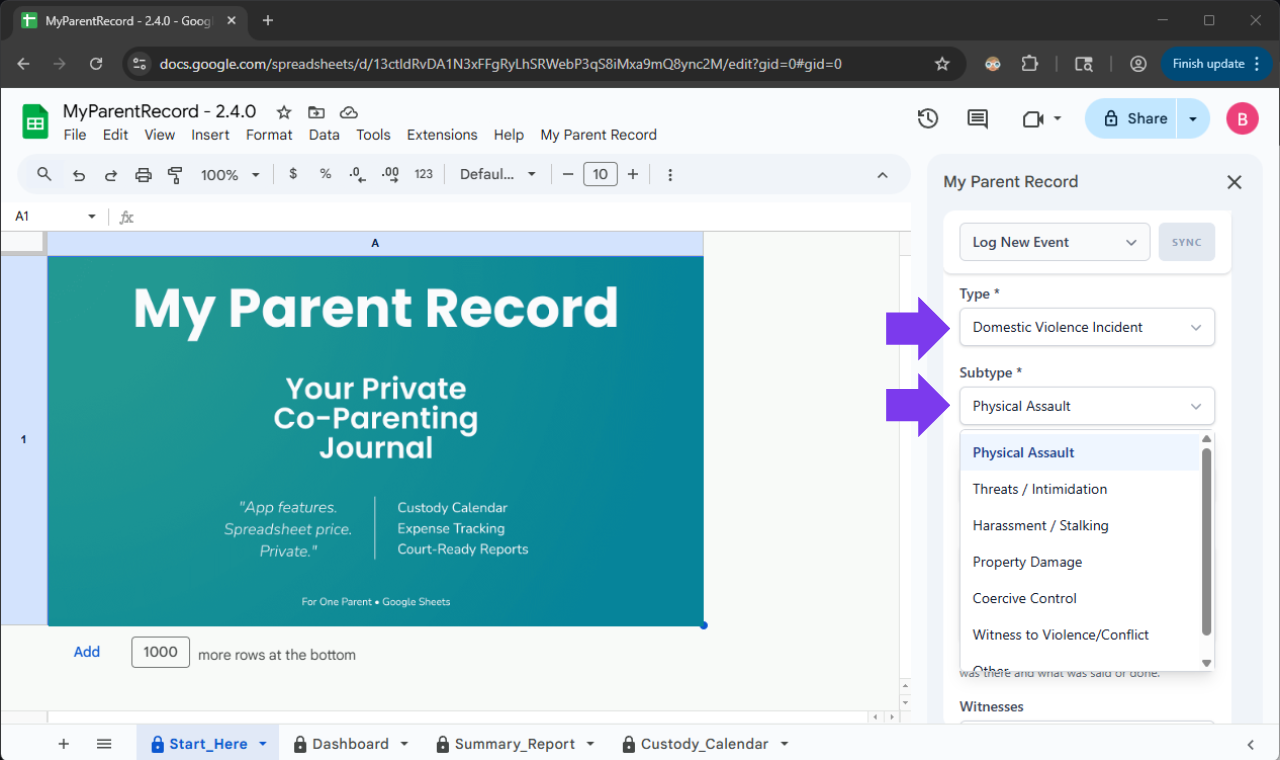
<p>When you’re in the middle of a high-conflict case, “Other” isn’t a descriptive enough category for your attorney. We’ve introduced <strong>Domestic Violence Incident</strong> as a first-class logging sub-category. You can now tag specific behaviors like <em>Coercive Control</em>, <em>Stalking</em>, and <em>Intimidation</em> with legal-grade precision.</p>

<p>Additionally, we added a <strong>“Reported To”</strong> selector. This allows you to instantly link an incident to a police report, Child Protective Services, or a mediator, building a chronological “trail of evidence” that proves a consistent pattern of behavior over time.</p>

<p><img src="/assets/images/releases/v2-4-0/domestic-violence-logging.png" alt="Domestic Violence Incident Logging" class="w-full rounded-lg border border-white/10 shadow-lg" /></p>

<hr />

<h3 id="2-blended-family-recognition-the-stepparent-role">2. Blended Family Recognition: The Stepparent Role</h3>

<p><strong>The Request:</strong></p>

<blockquote>
  <p>One suggestion I have that may help in some cases is adding an option to add a step parent. If the step parents are involved and communicate with the other custodial parent that would be an easy way to keep up with all communication from all parties involved.</p>
</blockquote>

<p><strong>The Solution:</strong></p>

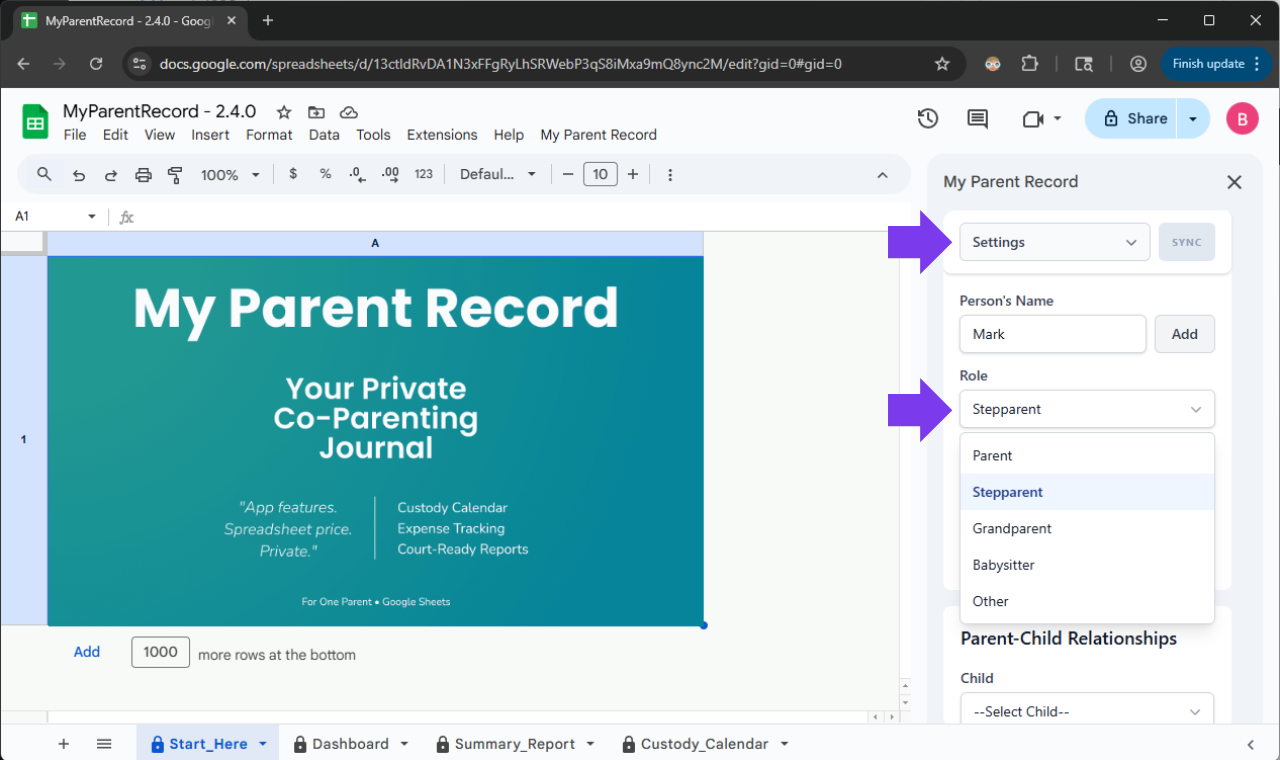
<p>In family law, accuracy is everything, but so is legal distinction. While stepparents often do the heavy lifting, they occupy a unique legal space. We’ve added “Stepparent” as a secondary role in your People settings to capture your operational reality without blurring legal lines.</p>

<p>While the Custody Calendar remains focused on the primary legal parents to ensure your overnight percentages stay accurate for child support, the Stepparent role is now fully supported in your daily Schedule &amp; Parenting Time logs, Communication logs, Incident Reports, and all other log events. This ensures your logs provide a 100% factual representation of the adults physically involved in your children’s lives, providing your attorney with a clear picture of who is actually present during transitions and events.</p>

<p><img src="/assets/images/releases/v2-4-0/stepparent-role.png" alt="Stepparent Role" class="w-full rounded-lg border border-white/10 shadow-lg" /></p>

<hr />

<h2 id="a-note-from-us-your-reality-drives-our-roadmap">A Note From Us: Your Reality Drives Our Roadmap</h2>

<p>Every major feature in this update started as a message from a parent navigating the complex, often stressful reality of family law.</p>

<p>When you take the time to tell us, “I need to document this specific pattern,” or “The app needs to reflect who is actually present at exchanges,” you aren’t just helping yourself—you’re building a more robust safety net for every other parent using this tool. The new Domestic Violence Incident logging exists because a parent requested it for their situation. The new Stepparent role was added because a family needed to log their daily operational truth without compromising their primary legal custody math.</p>

<p>Your reality drives our roadmap. If there is a feature that would make your life easier, your documentation clearer, or your journey through the legal system a little more organized, please let us know. We are listening.</p>

<h2 id="a-small-favor-help-us-reach-more-parents">A Small Favor: Help Us Reach More Parents</h2>

<p>We are a small team, and we rely entirely on word-of-mouth. If this app has given you a little more peace of mind, would you consider leaving a quick review on Etsy? It takes less than 60 seconds, but for a parent searching for a “safety net” in a tough moment, your review might be the reason they finally find the tool they need. You’re not just helping us; you’re helping another parent find their footing.</p>

<!-- Button -->

<p><a href="https://www.etsy.com/your/purchases" target="_blank" class="block w-full text-center bg-brand-purple text-white font-bold py-3 rounded-xl relative z-10 shadow-sm no-underline hover:no-underline" style="color:#ffffff!important;"> Leave a Review
</a></p>]]></content><author><name>Verascribe Editorial</name></author><category term="Feature" /><summary type="html"><![CDATA[New Features: Built for Your Reality]]></summary></entry><entry><title type="html">Import Timeout</title><link href="https://myverascribe.com/bug%20fix/2026/02/11/v2-4-1.html" rel="alternate" type="text/html" title="Import Timeout" /><published>2026-02-11T00:00:00+00:00</published><updated>2026-02-11T00:00:00+00:00</updated><id>https://myverascribe.com/bug%20fix/2026/02/11/v2-4-1</id><content type="html" xml:base="https://myverascribe.com/bug%20fix/2026/02/11/v2-4-1.html"><![CDATA[]]></content><author><name>Verascribe Editorial</name></author><category term="Bug Fix" /><summary type="html"><![CDATA[]]></summary></entry><entry><title type="html">You Asked, We Delivered</title><link href="https://myverascribe.com/feature/2026/01/31/v2-3-1.html" rel="alternate" type="text/html" title="You Asked, We Delivered" /><published>2026-01-31T00:00:00+00:00</published><updated>2026-01-31T00:00:00+00:00</updated><id>https://myverascribe.com/feature/2026/01/31/v2-3-1</id><content type="html" xml:base="https://myverascribe.com/feature/2026/01/31/v2-3-1.html"><![CDATA[<h2 id="new-features-designed-by-you">New Features: Designed by You</h2>

<p>We’ve been listening closely to your feedback, and this update is all about making your co-parenting workflow as smooth and secure as possible.</p>

<h2 id="the-improvements">The Improvements</h2>

<h3 id="1-plan-further-with-8-week-rhythms-user-requested">1. Plan Further with 8-Week Rhythms (User Requested!)</h3>

<p>The Request:</p>

<blockquote>
  <p>hey! is there any way to make the schedule grid longer? we do a 4 week rotation and right now i have to manually fix it every month. an 8 week option would be a lifesaver honestly lol</p>
</blockquote>

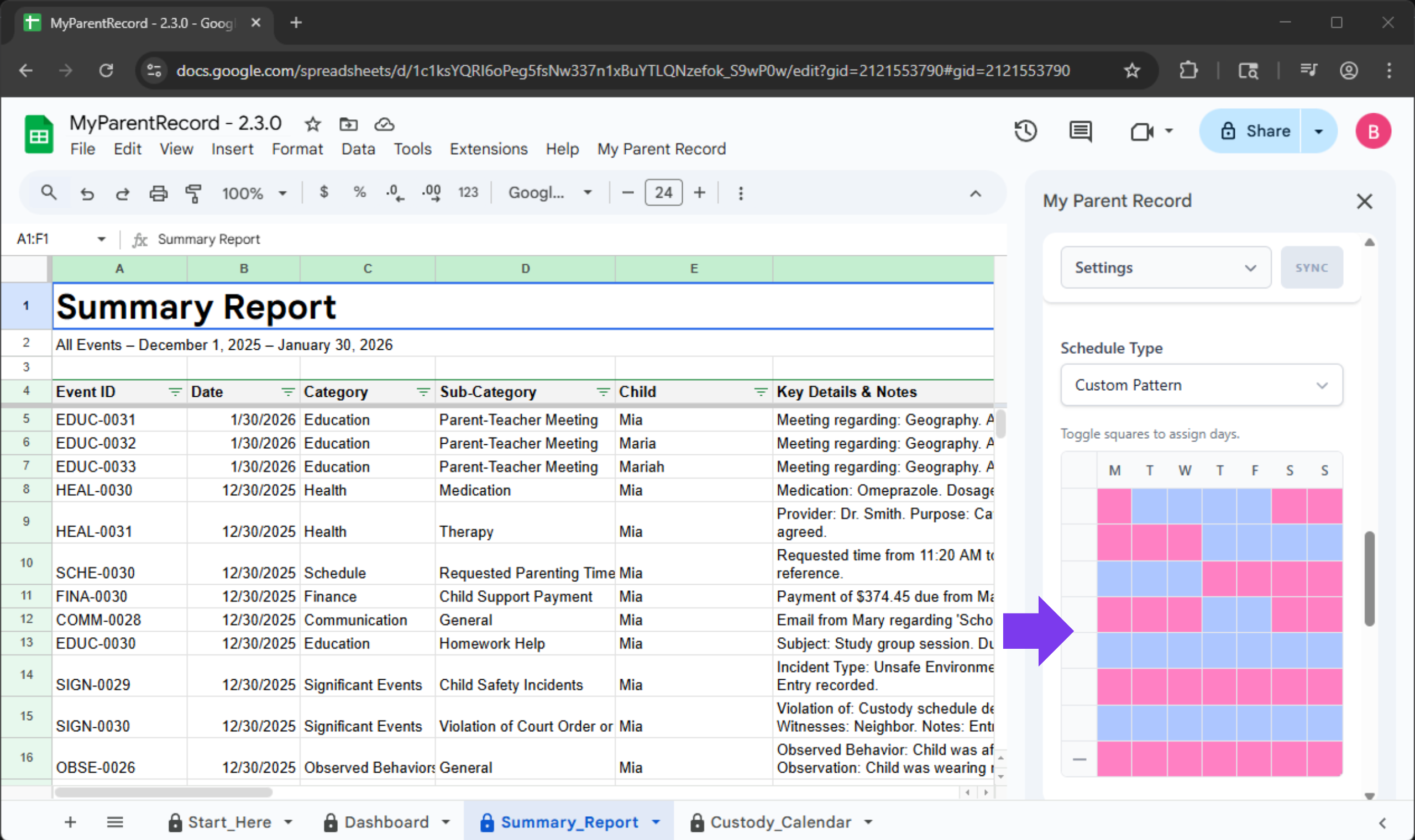
<p>Managing summer camp splits or every-other-month rotations shouldn’t feel like a puzzle. We’ve expanded the custom schedule grid to a full eight weeks. Now you can map out longer repeating patterns in one go, without the need to constantly adjust the schedule.</p>

<p><img src="/assets/images/releases/v2-3-0/8-week-grid.png" alt="8-Week Grid" class="w-full rounded-lg border border-white/10 shadow-lg" /></p>

<hr />

<h3 id="2-multi-child-logging-save-once-sync-everywhere-user-requested">2. Multi-Child Logging: Save Once, Sync Everywhere (User Requested!)</h3>

<p>The Request:</p>

<blockquote>
  <p>loving the app but quick question. is there a way to log one thing for all 3 kids at once? i have to type the same doctor visit 3 times and it takes forever. would love a ‘select all’ button</p>
</blockquote>

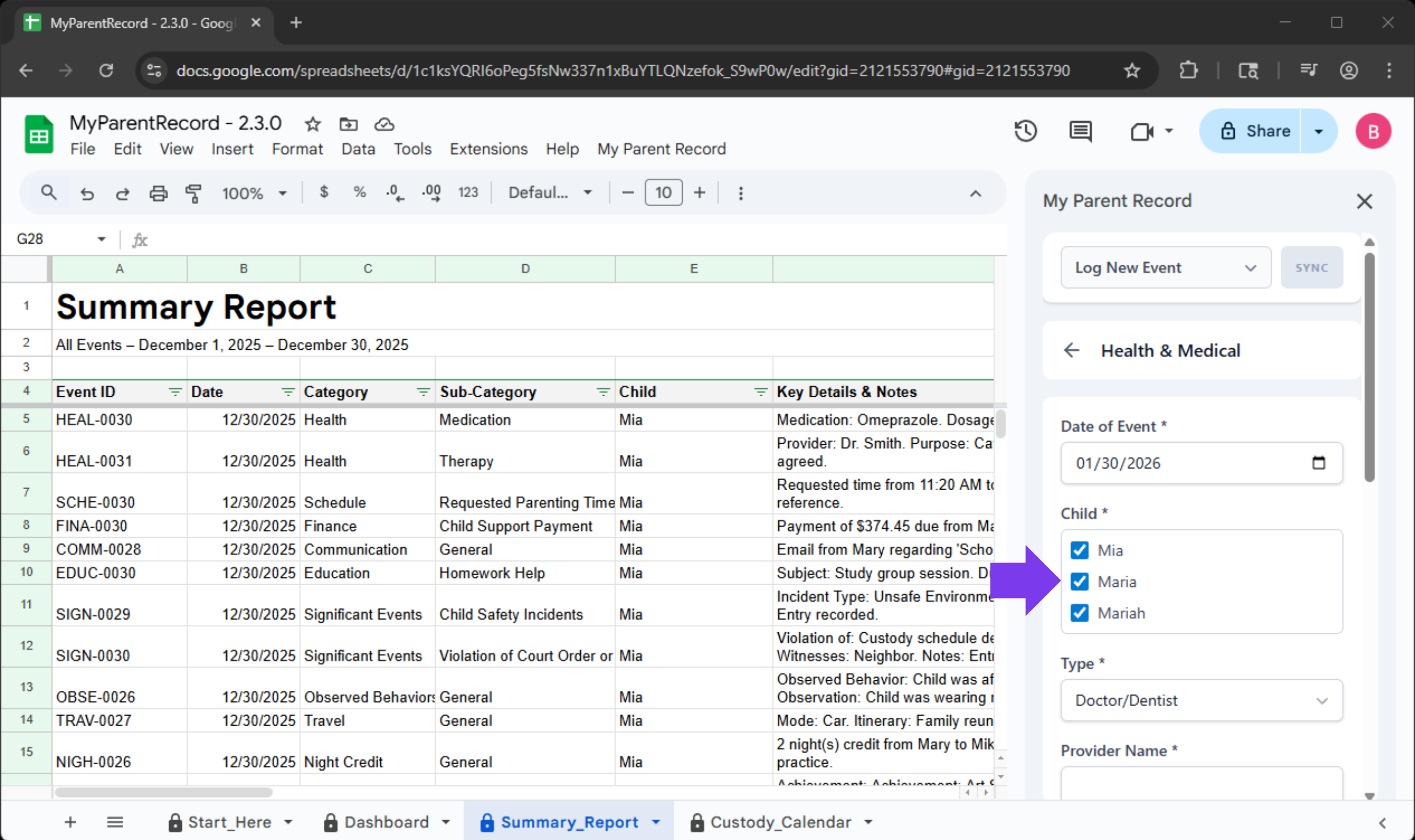
<p>If all the kids were at the same doctor’s visit, you shouldn’t have to type it three times. You can now log a single event for multiple children simultaneously. The app handles the heavy lifting, ensuring each child’s individual record is updated correctly, even if they have different parent combinations.</p>

<p><img src="/assets/images/releases/v2-3-0/multi-child-logging.png" alt="Multi-Child Logging" class="w-full rounded-lg border border-white/10 shadow-lg" /></p>

<hr />

<h3 id="3-clean-up-records-with-one-click-delete-user-requested">3. Clean Up Records with One-Click Delete (User Requested!)</h3>

<p>The Request:</p>

<blockquote>
  <p>ugh i accidentally logged the same payment twice on the sidebar. how do i get rid of it? i dont want my lawyer to think im padding the records if i print this out today. can we just have a delete button?</p>
</blockquote>

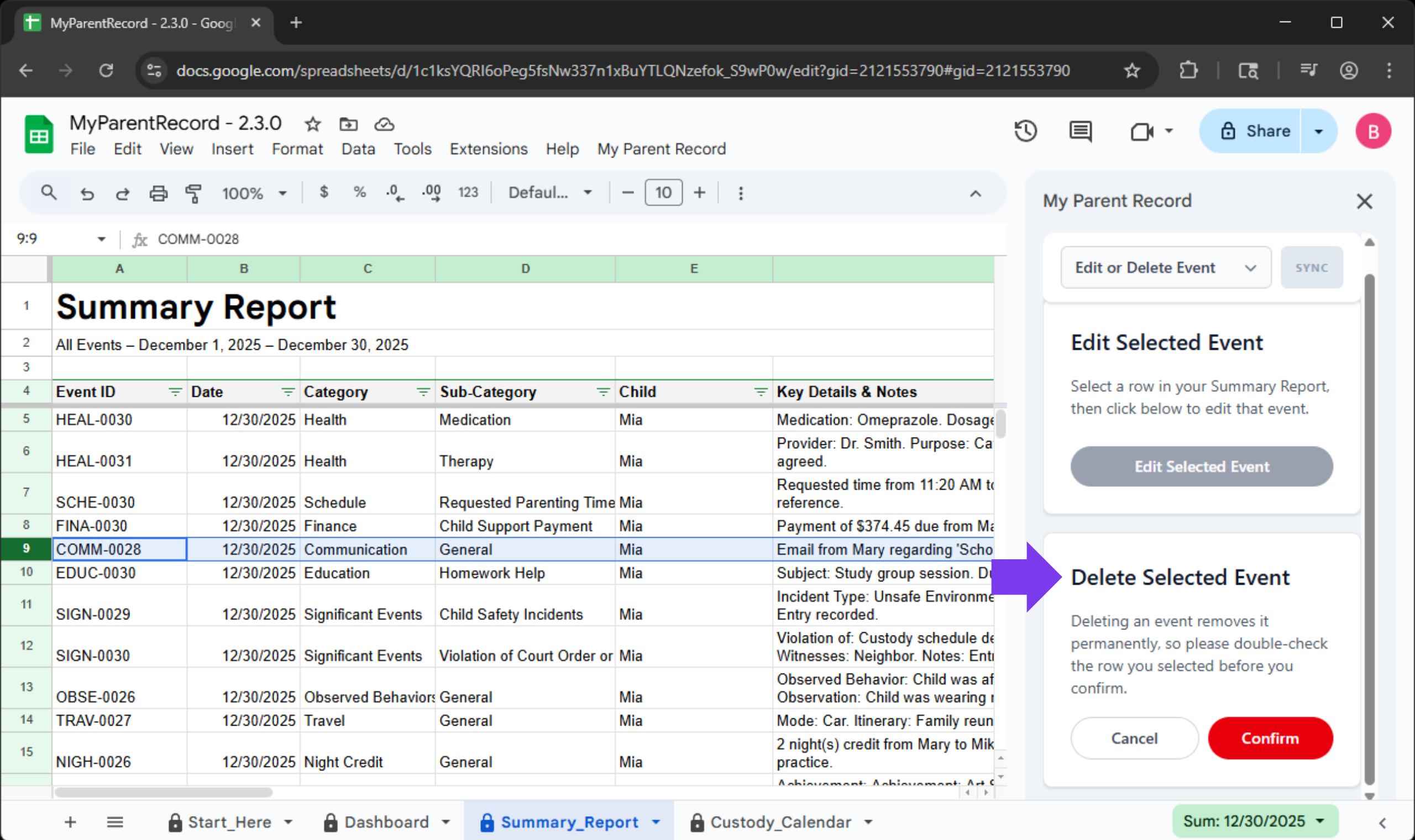
<p>We’ve simplified how you manage your history. You can now fully remove an event log directly from the sidebar. Simply select a row in your Summary Report and hit “Delete Selected Event.” It’s the fastest way to tidy up duplicates or accidental entries so your shared timeline stays professional and accurate.</p>

<p><img src="/assets/images/releases/v2-3-0/delete-selected-event.png" alt="Delete Selected Event" class="w-full rounded-lg border border-white/10 shadow-lg" /></p>

<hr />

<h3 id="4-the-escape-hatch-emergency-backup-user-requested">4. The “Escape Hatch” Emergency Backup (User Requested!)</h3>

<p>The Request:</p>

<blockquote>
  <p>i’m super paranoid… if google crashes or the app breaks do i lose all my logs?? i have important stuff in here. can we have a way to just download a backup for ourselves just in case?</p>
</blockquote>

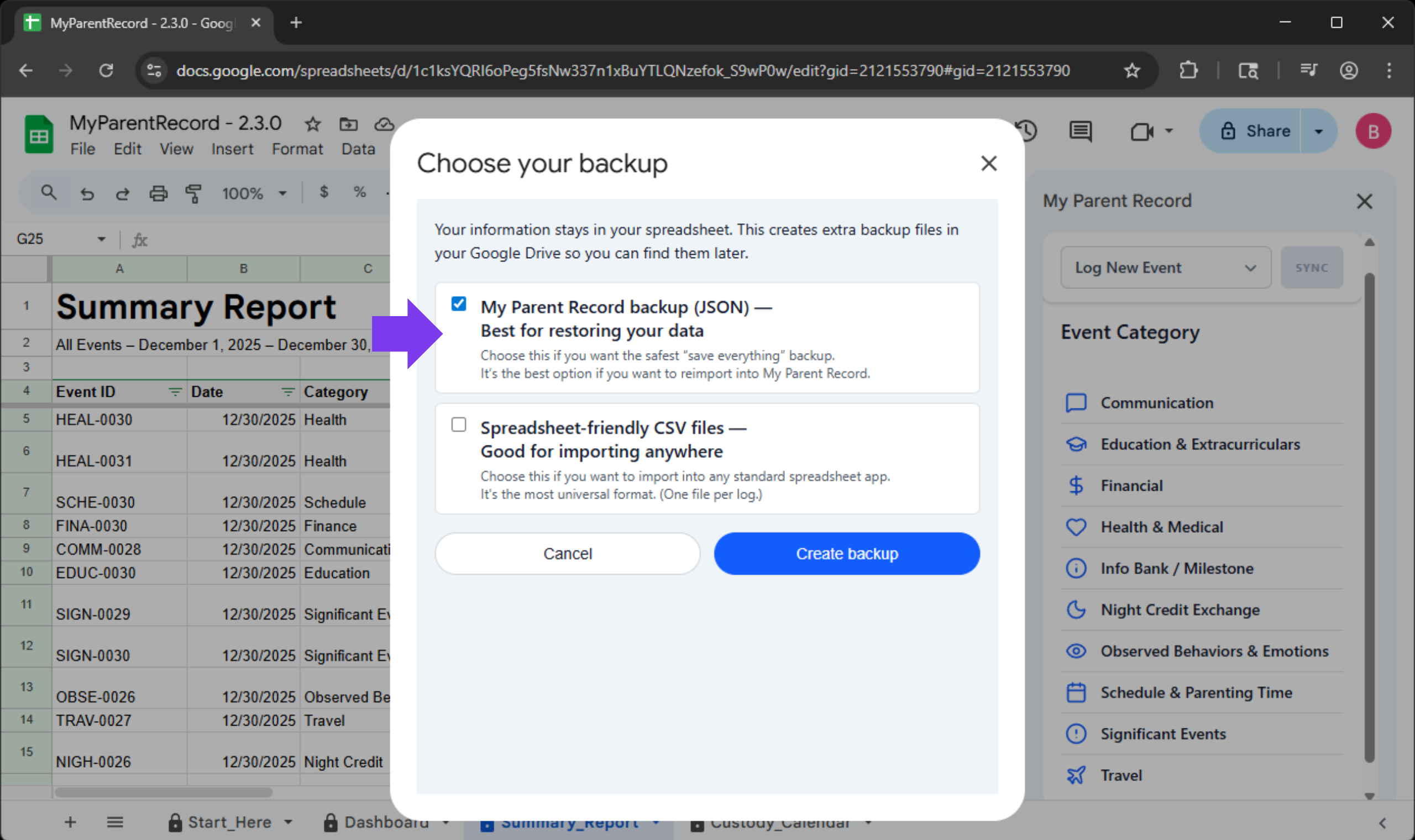
<p>Your records are more than just data—they are your peace of mind and, often, your legal protection. We’ve upgraded our backup functionality so you can grab a fresh, external copy of your data whenever you want. Even if the main app ever experiences a hiccup, your full logs and caregiving notes remain accessible to you.</p>

<p><img src="/assets/images/releases/v2-3-0/emergency-backup.png" alt="Emergency Backup" class="w-full rounded-lg border border-white/10 shadow-lg" /></p>

<p><strong>How to access it:</strong></p>

<ul>
  <li>Open the ‘Verascribe Guardian’ Menu.</li>
  <li>Select Emergency Backup.</li>
  <li>Choose your settings and let the app save your records directly to your Google Drive.</li>
</ul>

<p><strong>Why this is different (and why you need it):</strong></p>

<p>We already have export tools in the app, but they serve different purposes. Here is the breakdown:</p>

<table>
  <thead>
    <tr>
      <th>Feature</th>
      <th>Best For…</th>
      <th>Where it Saves</th>
      <th>File Format</th>
    </tr>
  </thead>
  <tbody>
    <tr>
      <td>Standard Export</td>
      <td>Upgrading your app or moving data.</td>
      <td>Your Desktop</td>
      <td>JSON (App-readable)</td>
    </tr>
    <tr>
      <td>Emergency Backup</td>
      <td>Long-term security &amp; peace of mind.</td>
      <td>Your Google Drive</td>
      <td>JSON + CSV (Spreadsheet-ready)</td>
    </tr>
  </tbody>
</table>

<hr />

<h2 id="icymi-221">ICYMI: 2.2.1</h2>

<h3 id="see-all-your-events-without-fuss-user-requested">See All Your Events Without Fuss (User Requested!)</h3>

<p>The Complaint:</p>

<blockquote>
  <p>I logged an event and it’s not showing up.</p>
</blockquote>

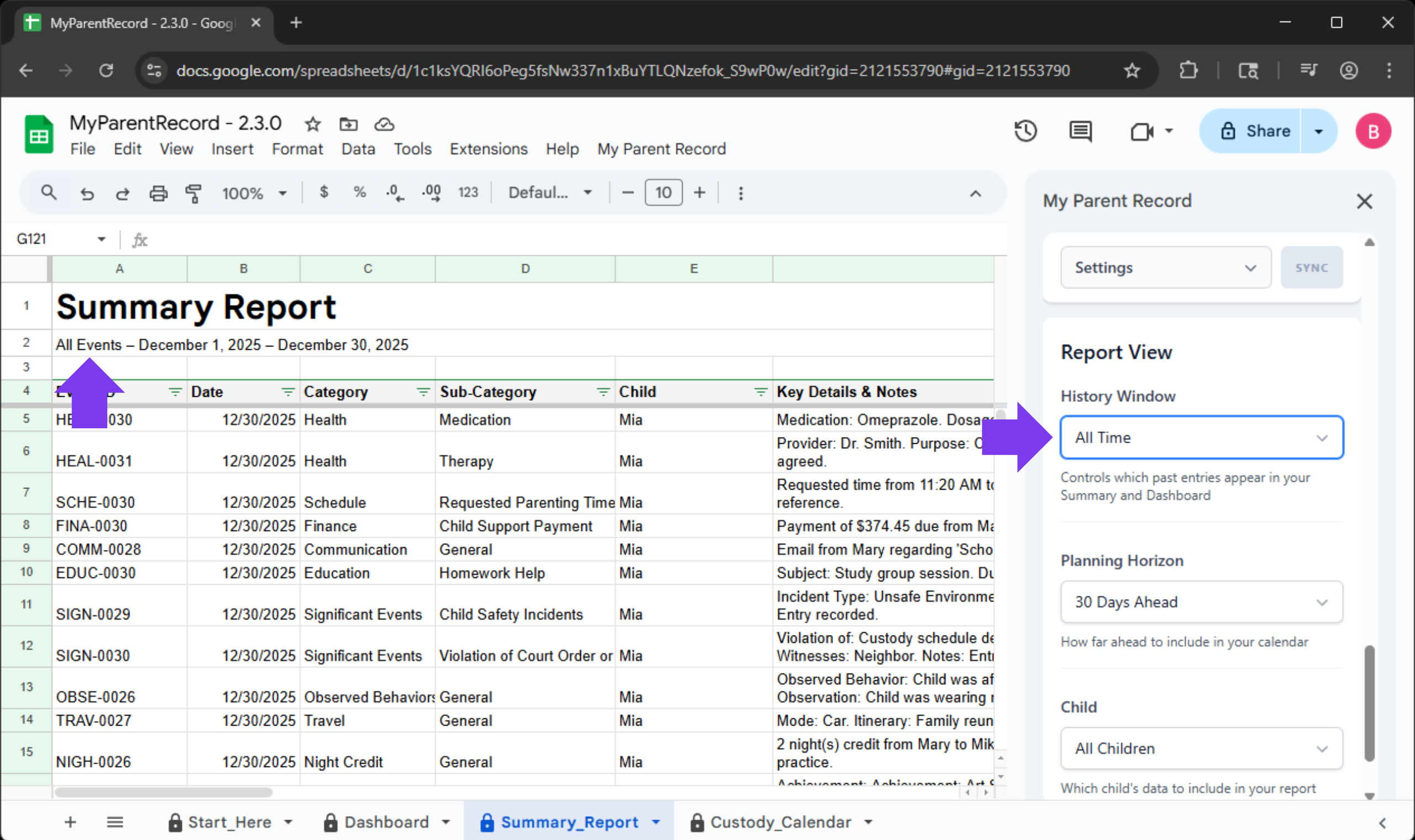
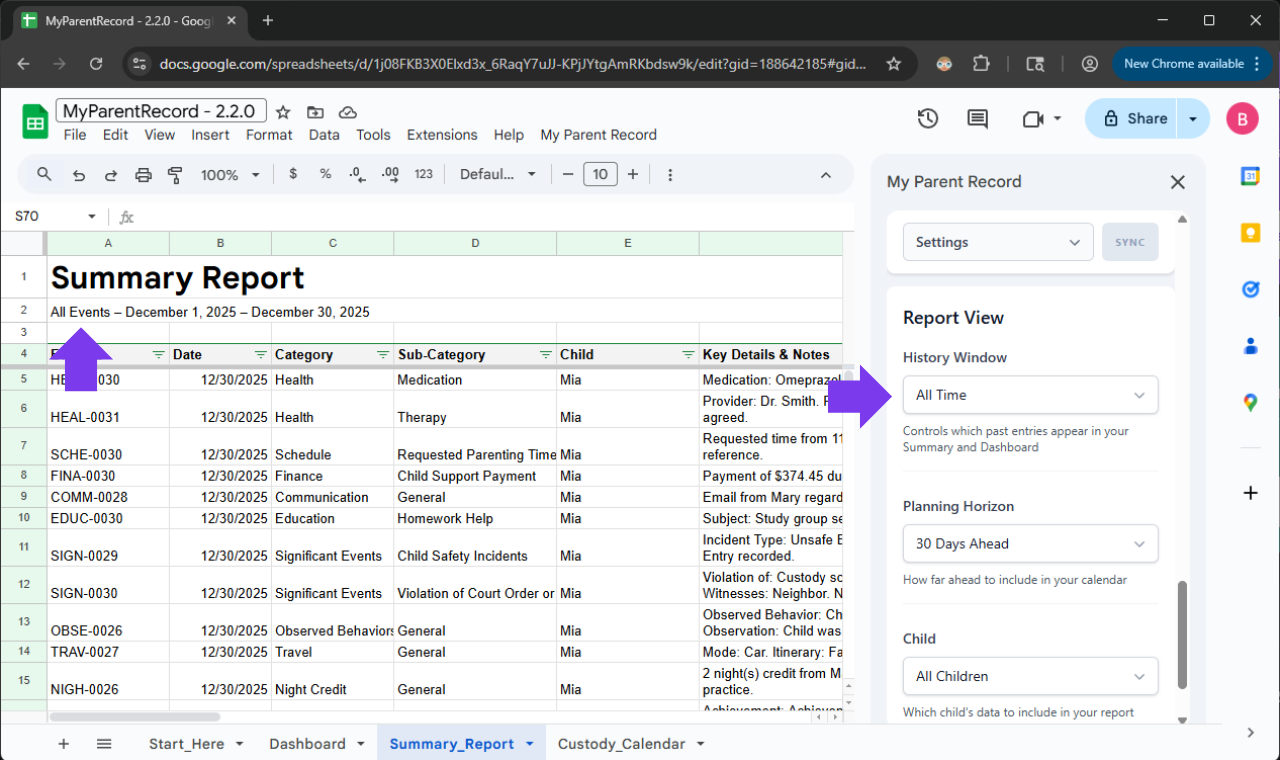
<p><strong>The Feature:</strong> “All Time” now truly includes every entry you’ve ever recorded. Your Dashboard, Summary Report, and event form stay in sync automatically—no more missing notes because a rolling time window ended too soon or was too narrow.</p>

<p><img src="/assets/images/releases/v2-3-0/all-time.png" alt="All Time Filter" class="w-full rounded-lg border border-white/10 shadow-lg" /></p>

<p><strong>Every memory stays visible—on your terms.</strong></p>

<p>We’ve renamed our core filters to be more intuitive, so the app speaks the same language you do:</p>

<ul>
  <li>
    <p>“Historical Window” (formerly Date Range) is for looking back at what happened.</p>
  </li>
  <li>
    <p>“Planning Horizon” (formerly Calendar View) is for looking ahead at what’s coming.</p>
  </li>
</ul>

<p><strong>The New “All Time” Option</strong>
We’ve added a new “All Time” setting to the Historical Window. When selected, the app automatically stretches to include every single entry you’ve ever made—from your very first log to your most recent update.</p>

<table>
  <thead>
    <tr>
      <th>Feature</th>
      <th>“All Time” (New)</th>
      <th>Rolling Window</th>
      <th>Fixed Date Range</th>
    </tr>
  </thead>
  <tbody>
    <tr>
      <td>What it shows</td>
      <td>Every single log you’ve ever entered.</td>
      <td>A set amount of time (e.g., “Last 30 Days”).</td>
      <td>A specific start and end date (e.g., “Jan 1 to Mar 1”).</td>
    </tr>
    <tr>
      <td>“The “Hands-Off” Factor”</td>
      <td>Set it and forget it. Automatically grows as you add logs.</td>
      <td>Updates every day to only show the most recent info.</td>
      <td>Stays frozen on those specific dates until you change them.</td>
    </tr>
    <tr>
      <td>Best Used For…</td>
      <td>Complete history. Ensuring no detail is ever missing.</td>
      <td>Day-to-day focus. Seeing what happened this month.</td>
      <td>Specific Events. Prepping for a mediation about a specific holiday or summer.</td>
    </tr>
    <tr>
      <td>Action Required</td>
      <td>None. It stretches to find your very first and very last entry.</td>
      <td>None. It “moves” with you through the year.</td>
      <td>Manual. You have to update the dates yourself.</td>
    </tr>
  </tbody>
</table>

<p><strong>A Note for Our Existing Users:</strong> Because we respect the custom settings you’ve already perfected, we will not automatically change your current view. If you want your reports to default to the “All Time” view, just head over to Settings &gt; Report View and update your preference. We want you to stay in the driver’s seat.</p>

<hr />

<h3 id="reflecting-the-real-ways-people-communicate-user-requested">Reflecting The Real Ways People Communicate (User Requested!)</h3>

<p>The Request:</p>

<blockquote>
  <p>If you take suggestions. A messenger option under communication would be nice. I am currently putting those under text.</p>
</blockquote>

<p><strong>Log It Where It Happens: Modern Communication</strong></p>

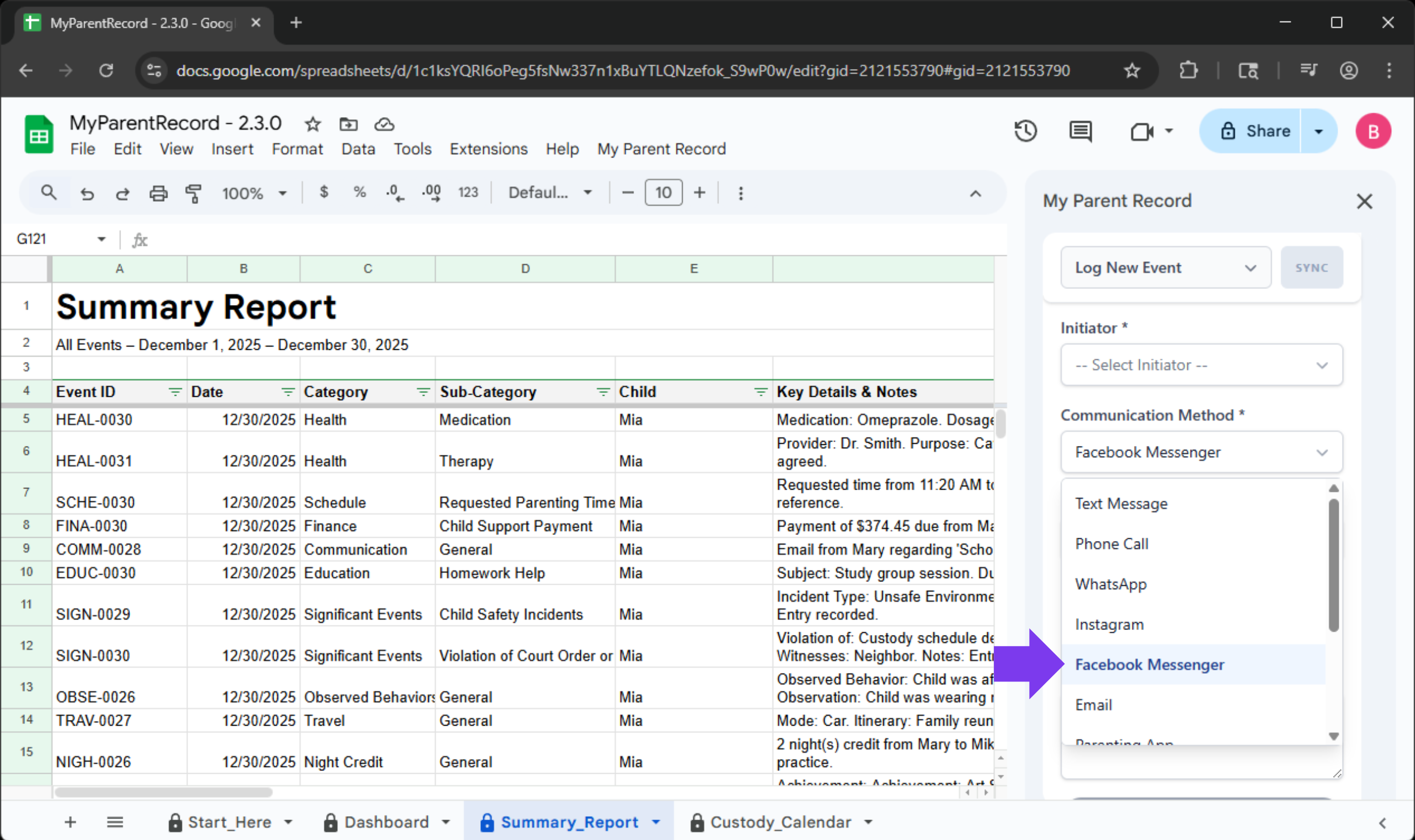
<p>Life doesn’t just happen in an inbox. We know that a quick check-in about pickup might happen on WhatsApp, or a shared photo might be sent via Instagram. Your records should reflect your reality.</p>

<p><img src="/assets/images/releases/v2-3-0/communications-methods.png" alt="Communication Methods" class="w-full rounded-lg border border-white/10 shadow-lg" /></p>

<p>The <strong>Communication Log</strong> now includes specific options for the channels you already use:</p>

<ul>
  <li>WhatsApp &amp; Facebook Messenger</li>
  <li>Snapchat &amp; Instagram</li>
  <li>X (formerly Twitter)</li>
</ul>

<p><strong>How to log your chat:</strong></p>

<ul>
  <li>Open the sidebar and choose the Communication category.</li>
  <li>Select the Method you used (e.g., WhatsApp).</li>
  <li>Save your entry.</li>
</ul>

<p><strong>Pro-Tip:</strong> By being specific about where a conversation happened, you create a much stronger “paper trail” if you ever need to reference a specific thread later. It removes the “I can’t remember where we talked about that” stress.</p>

<hr />

<h2 id="a-note-from-us-we-hear-you">A Note From Us: We Hear You</h2>

<p>Every major feature in this update started as a message from a parent just like you.</p>

<p>When you take the time to tell us, “I wish the app did this,” or “I’m worried about my data,” you aren’t just helping yourself—you’re building a better safety net for every other parent using this tool. The new 8-week schedule grid exists because a dad needed to map out a month-on, month-off rotation without the headache of manual overrides. The new “Escape Hatch” backup exists because a parent needed to know their full record was safe, no matter what.</p>

<p>Your reality drives our roadmap. If there is something that would make your life easier or your records clearer, please let us know. We are listening.</p>

<h2 id="a-small-favor-help-us-reach-more-parents">A Small Favor: Help Us Reach More Parents</h2>

<p>We are a small team, and we rely entirely on word-of-mouth. If this app has given you a little more peace of mind, would you consider leaving a quick review on Etsy? It takes less than 60 seconds, but for a parent searching for a “safety net” in a tough moment, your review might be the reason they finally find the tool they need. You’re not just helping us; you’re helping another parent find their footing.</p>

<!-- Button -->

<p><a href="https://www.etsy.com/your/purchases" target="_blank" class="block w-full text-center bg-brand-purple text-white font-bold py-3 rounded-xl relative z-10 shadow-sm no-underline hover:no-underline" style="color:#ffffff!important;"> Leave a Review
</a></p>]]></content><author><name>Verascribe Editorial</name></author><category term="Feature" /><summary type="html"><![CDATA[New Features: Designed by You]]></summary></entry><entry><title type="html">See All Your Events Without Fuss</title><link href="https://myverascribe.com/feature/2026/01/25/v2-2-1.html" rel="alternate" type="text/html" title="See All Your Events Without Fuss" /><published>2026-01-25T00:00:00+00:00</published><updated>2026-01-25T00:00:00+00:00</updated><id>https://myverascribe.com/feature/2026/01/25/v2-2-1</id><content type="html" xml:base="https://myverascribe.com/feature/2026/01/25/v2-2-1.html"><![CDATA[<h2 id="summary">Summary</h2>

<p>In Version 2.2.1, we focused heavily on user pain points and error safety, and bug fixes.</p>

<h2 id="the-improvements">The Improvements</h2>

<h3 id="1-see-all-your-events-without-fuss-user-requested">1. See All Your Events Without Fuss (User Requested!)</h3>

<p>The Complaint:</p>

<blockquote>
  <p>I logged an event and it’s not showing up.</p>
</blockquote>

<p><strong>The Feature:</strong> “All Time” now truly includes every entry you’ve ever recorded. Your Dashboard, Summary Report, and event form stay in sync automatically—no more missing notes because a rolling time window ended too soon or was too narrow.</p>

<p><img src="/assets/images/releases/v2-2-1/all-time.png" alt="All Time Filter" class="w-full rounded-lg border border-white/10 shadow-lg" /></p>

<p><strong>Every memory stays visible—on your terms.</strong></p>

<p>We’ve renamed our core filters to be more intuitive, so the app speaks the same language you do:</p>

<ul>
  <li>
    <p>“Historical Window” (formerly Date Range) is for looking back at what happened.</p>
  </li>
  <li>
    <p>“Planning Horizon” (formerly Calendar View) is for looking ahead at what’s coming.</p>
  </li>
</ul>

<p><strong>The New “All Time” Option</strong>
We’ve added a new “All Time” setting to the Historical Window. When selected, the app automatically stretches to include every single entry you’ve ever made—from your very first log to your most recent update.</p>

<table>
  <thead>
    <tr>
      <th>Feature</th>
      <th>“All Time” (New)</th>
      <th>Rolling Window</th>
      <th>Fixed Date Range</th>
    </tr>
  </thead>
  <tbody>
    <tr>
      <td>What it shows</td>
      <td>Every single log you’ve ever entered.</td>
      <td>A set amount of time (e.g., “Last 30 Days”).</td>
      <td>A specific start and end date (e.g., “Jan 1 to Mar 1”).</td>
    </tr>
    <tr>
      <td>“The “Hands-Off” Factor”</td>
      <td>Set it and forget it. Automatically grows as you add logs.</td>
      <td>Updates every day to only show the most recent info.</td>
      <td>Stays frozen on those specific dates until you change them.</td>
    </tr>
    <tr>
      <td>Best Used For…</td>
      <td>Complete history. Ensuring no detail is ever missing.</td>
      <td>Day-to-day focus. Seeing what happened this month.</td>
      <td>Specific Events. Prepping for a mediation about a specific holiday or summer.</td>
    </tr>
    <tr>
      <td>Action Required</td>
      <td>None. It stretches to find your very first and very last entry.</td>
      <td>None. It “moves” with you through the year.</td>
      <td>Manual. You have to update the dates yourself.</td>
    </tr>
  </tbody>
</table>

<p><strong>A Note for Our Existing Users:</strong> Because we respect the custom settings you’ve already perfected, we will not automatically change your current view. If you want your reports to default to the “All Time” view, just head over to Settings &gt; Report View and update your preference. We want you to stay in the driver’s seat.</p>

<hr />

<h3 id="2-reflecting-the-real-ways-people-communicate-user-requested">2. Reflecting The Real Ways People Communicate (User Requested!)</h3>

<p>The Request:</p>

<blockquote>
  <p>If you take suggestions. A messenger option under communication would be nice. I am currently putting those under text.</p>
</blockquote>

<p><strong>Log It Where It Happens: Modern Communication</strong></p>

<p>Life doesn’t just happen in an inbox. We know that a quick check-in about pickup might happen on WhatsApp, or a shared photo might be sent via Instagram. Your records should reflect your reality.</p>

<p><img src="/assets/images/releases/v2-3-0/communications-methods.png" alt="Communication Methods" class="w-full rounded-lg border border-white/10 shadow-lg" /></p>

<p>The <strong>Communication Log</strong> now includes specific options for the channels you already use:</p>

<ul>
  <li>WhatsApp &amp; Facebook Messenger</li>
  <li>Snapchat &amp; Instagram</li>
  <li>X (formerly Twitter)</li>
</ul>

<p><strong>How to log your chat:</strong></p>

<ul>
  <li>Open the sidebar and choose the Communication category.</li>
  <li>Select the Method you used (e.g., WhatsApp).</li>
  <li>Save your entry.</li>
</ul>

<p><strong>Pro-Tip:</strong> By being specific about where a conversation happened, you create a much stronger “paper trail” if you ever need to reference a specific thread later. It removes the “I can’t remember where we talked about that” stress.</p>

<hr />

<h2 id="a-note-from-us-we-hear-you">A Note From Us: We Hear You</h2>

<p>Every major feature in this update started as an email or a message from a parent just like you.</p>

<p>When you take the time to tell us, “I wish the app did this,” or “This part is confusing,” you aren’t just helping yourself—you are building a better safety net for other parents navigating the same journey. The new “Personal Expense” tracker exists because one mom needed to prove her financial contribution in mediation. The new “Segmented Schedule” tool exists because a mom needed to handle a temporary custody shift without breaking her records.</p>

<p>Your reality drives our roadmap. If there is something that would make your life easier or your records clearer, please let us know. We are listening.</p>]]></content><author><name>Verascribe Editorial</name></author><category term="Feature" /><summary type="html"><![CDATA[Summary]]></summary></entry><entry><title type="html">Personal Expenses, Flexible Schedules, and Enhanced Privacy</title><link href="https://myverascribe.com/feature/2026/01/11/v2-1-0.html" rel="alternate" type="text/html" title="Personal Expenses, Flexible Schedules, and Enhanced Privacy" /><published>2026-01-11T00:00:00+00:00</published><updated>2026-01-11T00:00:00+00:00</updated><id>https://myverascribe.com/feature/2026/01/11/v2-1-0</id><content type="html" xml:base="https://myverascribe.com/feature/2026/01/11/v2-1-0.html"><![CDATA[<p>We understand that when you use this app, you are trusting us with the most sensitive parts of your life—your children’s schedule and your financial history. You need a tool that is not only powerful and private but also responsive to the real-world challenges you face every day.</p>

<h2 id="summary">Summary</h2>

<p>In Version 2.1.0, we focused heavily on trust, flexibility, and listening to you. Many of the features in this update came directly from conversations with parents who needed specific tools to tell their story accurately.</p>

<h2 id="our-belief">Our Belief</h2>

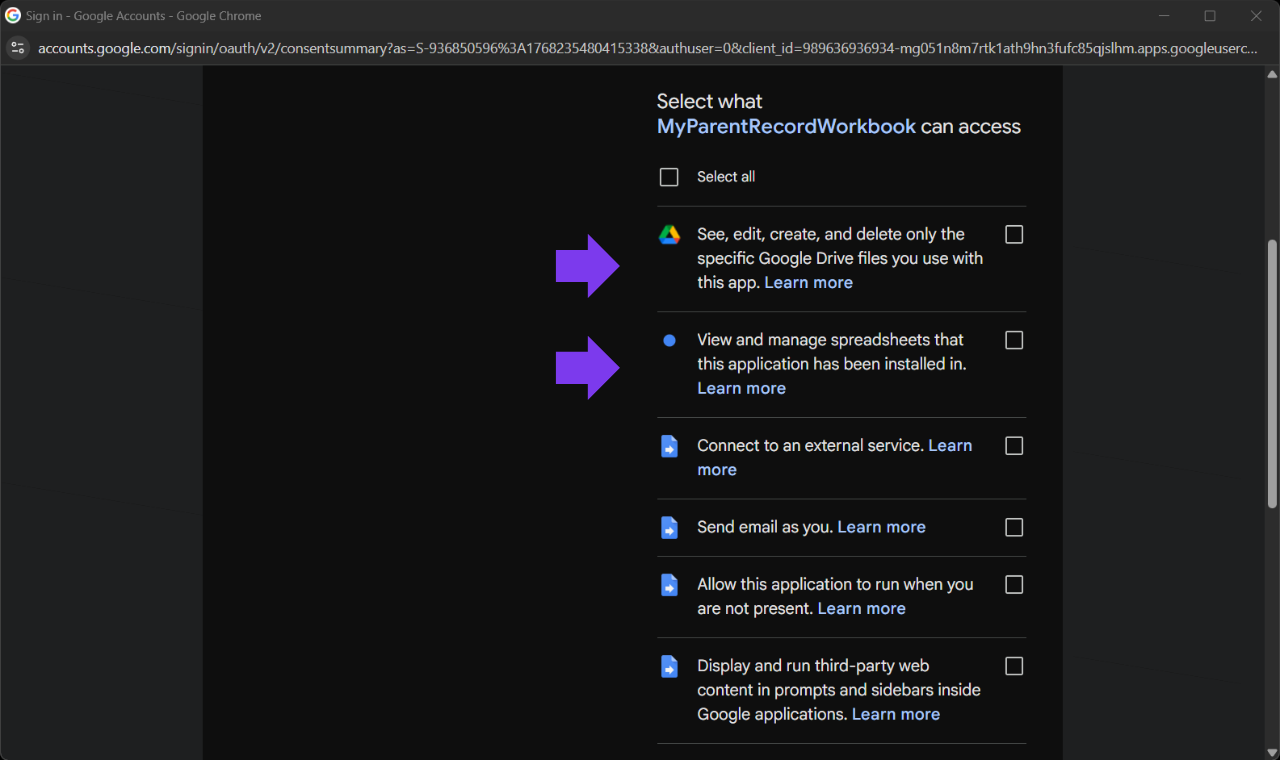
<p>We believe your privacy is non-negotiable. Many of you reached out concerned that Google asked for permission to “See, edit, create, and delete ALL of your Google Drive files.” We agreed—that was too broad. Even though we never looked at your personal files, the possibility shouldn’t exist.</p>

<p>We also believe that your records should reflect your reality—not the limitations of an app. When you told us you needed to track your own spending or handle tricky summer schedule changes, we made it our priority.</p>

<h2 id="our-approach">Our Approach</h2>

<p>We completely overhauled the app’s security architecture and core tools.</p>

<p><strong>For Privacy:</strong> We migrated to a newer, stricter Google technology (Advanced Drive Service v3) that restricts Verascribe Guardian so it can only see and touch the specific files it created. It literally cannot see your personal photos, tax documents, or other spreadsheets.</p>

<p><strong>For Finances:</strong> We updated the math engine to support a “Three Bucket” system (Shared, Support, and now Personal), giving you a complete financial picture without messing up debt calculations.</p>

<p><strong>For Schedules:</strong> We removed the “locks” on the calendar tool, trusting you to define when a schedule starts and ends.</p>

<h2 id="the-features">The Features</h2>

<h3 id="1-a-major-privacy-upgrade">1. A Major Privacy Upgrade</h3>

<p>The Request:</p>

<blockquote>
  <p>Make the Google permissions less scary.</p>
</blockquote>

<p><img src="/assets/images/releases/v2-1-0/google-permissions.png" alt="Google Permissions" class="w-full rounded-lg border border-white/10 shadow-lg" /></p>

<p><strong>The Result:</strong> The app no longer asks for full access to your entire Google Drive. It now only asks for permission to manage the specific “Verascribe Guardian” files and folders. This ensures your private digital life stays private.</p>

<p><strong>“See, edit, create, and delete only the specific Google Drive files you use with this app”:</strong>
We strictly limit the app so it can only touch files it created itself. It needs this to generate your PDF reports and save backups. It cannot see your personal photos or other documents.</p>

<p><strong>“View and manage spreadsheets”:</strong>
The app lives inside a spreadsheet. It needs permission to write down the events, expenses, and schedules you type into the sidebar.</p>

<p><strong>“Connect to an external service”:</strong>
This allows the app to securely check your license key and ensure it is active.</p>

<p><strong>“Send email as you”:</strong>
This is used only when you click the “Contact Support” button in the sidebar. It allows the app to send a support email on your behalf. We never send emails without you clicking that button.</p>

<p><strong>“Run when you are not present”:</strong>
This allows the app to perform nightly housekeeping while you sleep—like updating your dashboard so your “Last 30 Days” view is accurate when you wake up.
<em>Note (updated): this permission was removed in a later version. Dashboard refreshes now happen client-side when you open the app, so background scheduling is no longer needed.</em></p>

<p><strong>“Display third-party web content”:</strong>
This is simply the technology that powers the visual menu and buttons (the sidebar) on the right side of your screen.</p>

<h3 id="2-personal-expense-tracking-user-requested">2. “Personal Expense” Tracking (User Requested!)</h3>

<p>The Request:</p>

<blockquote>
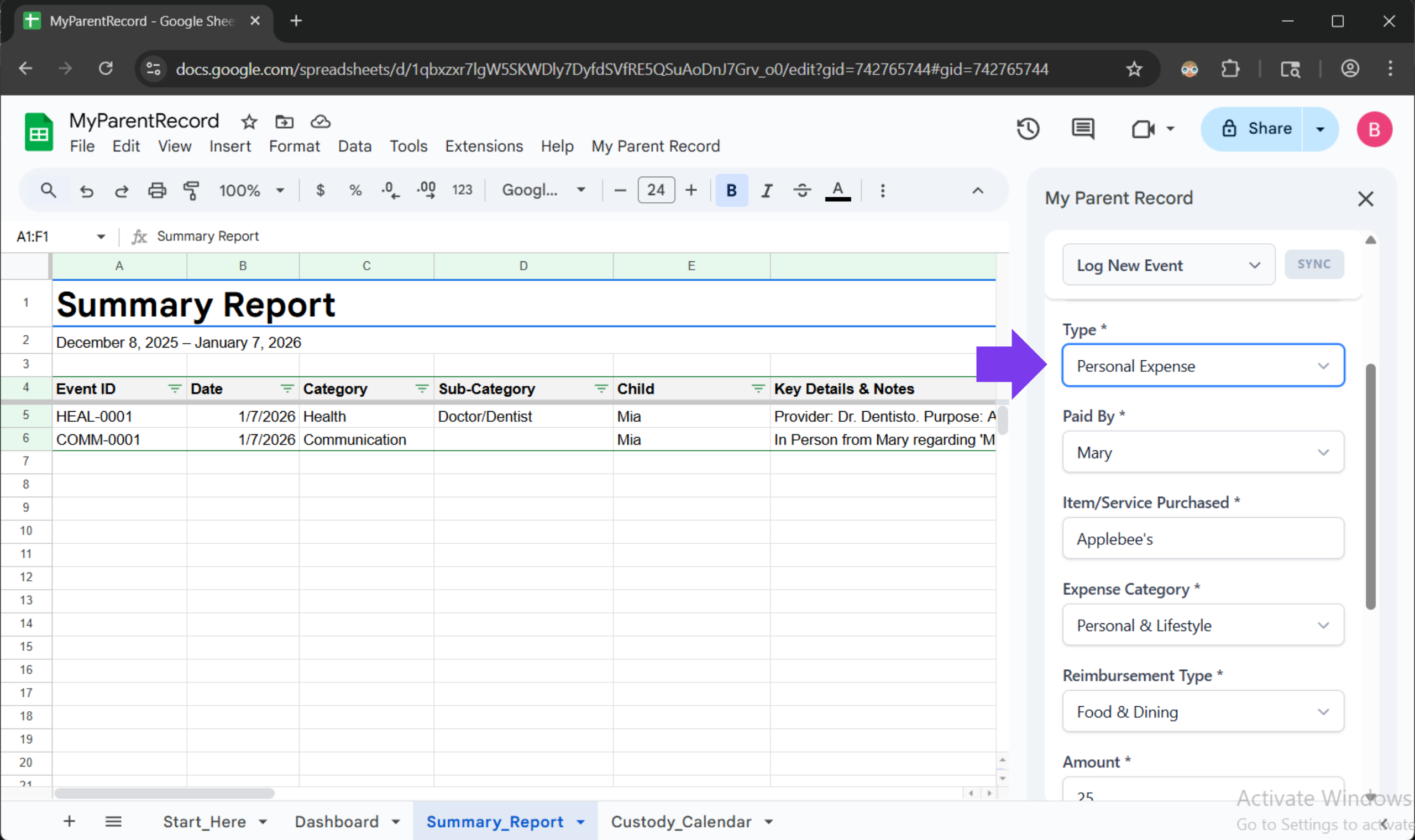
  <p>I spend money on my kids that I don’t expect my ex to pay back, but I still need to prove to the court how much it costs to raise them.</p>
</blockquote>

<p><img src="/assets/images/releases/v2-1-0/personal-expenses.png" alt="Personal Expenses" class="w-full rounded-lg border border-white/10 shadow-lg" /></p>

<p><strong>The Feature:</strong> You can now log these as “Personal Expenses.” This allows you to track the total cost of raising your child for your own records, without erroneously telling the app that your co-parent owes you money for them.</p>

<p><strong>Bonus:</strong> You can now track exactly how you paid (Credit Card, Cash, HSA, Venmo) for every single expense.</p>

<h3 id="3-real-world-scheduling-user-requested">3. Real-World Scheduling (User Requested!)</h3>

<p>The Request:</p>

<blockquote>
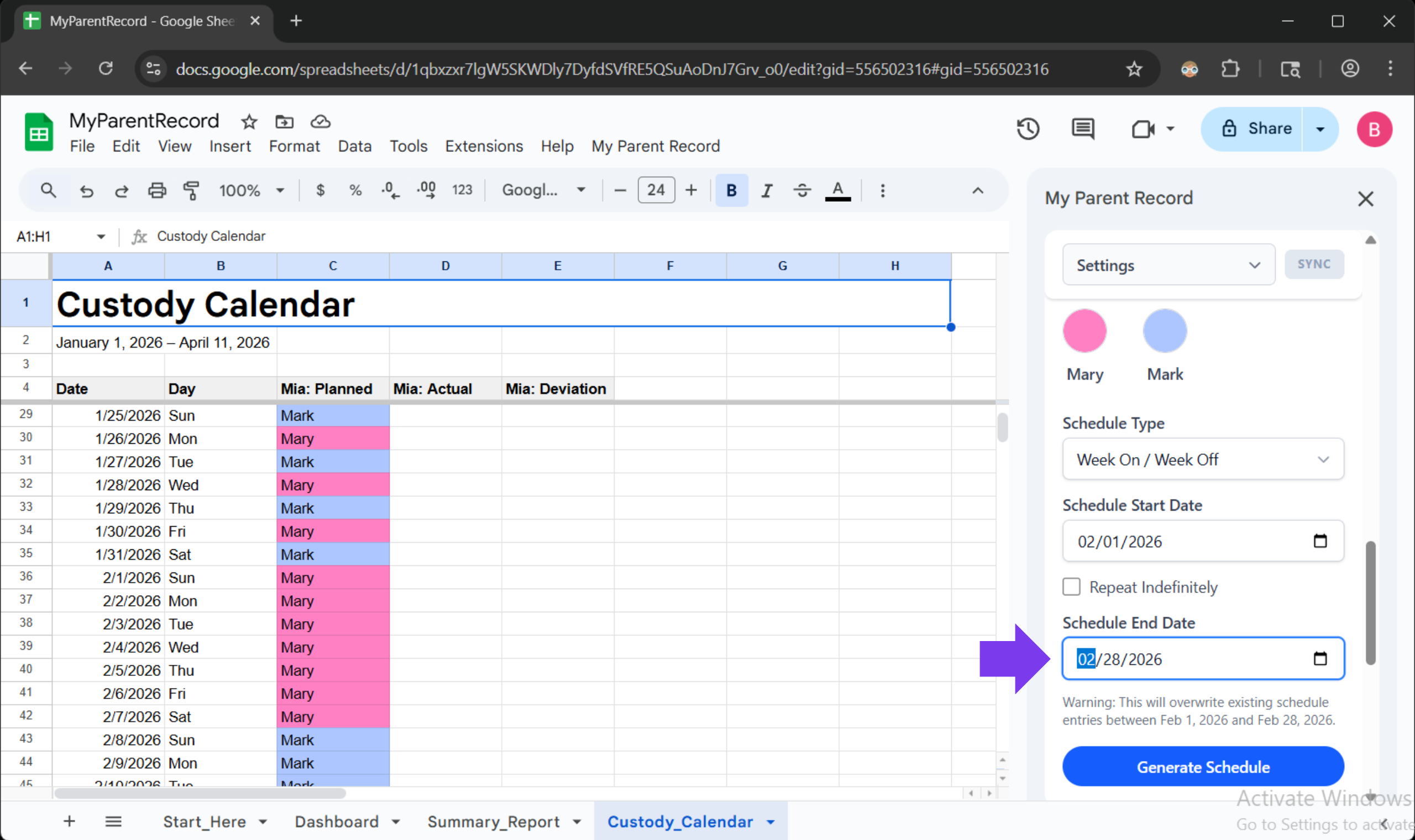
  <p>My custody schedule changes in the summer. I need a calendar that shows ‘Week On/Off’ for June, but keeps my normal schedule for September.</p>
</blockquote>

<p><img src="/assets/images/releases/v2-1-0/segmented-calendar.png" alt="Segmented Calendar" class="w-full rounded-lg border border-white/10 shadow-lg" /></p>

<p><strong>The Feature:</strong> The Schedule Generator now supports Date Ranges. You can tell it to generate a schedule just for June 1st to August 31st, without wiping out the schedule you already built for the fall. You can also retroactively fix mistakes in the past without breaking the future.</p>

<h2 id="a-note-from-us-we-hear-you">A Note From Us: We Hear You</h2>

<p>Every major feature in this update started as an email or a message from a parent just like you.</p>

<p>When you take the time to tell us, “I wish the app did this,” or “This part is confusing,” you aren’t just helping yourself—you are building a better safety net for other parents navigating the same journey. The new “Personal Expense” tracker exists because one mom needed to prove her financial contribution in mediation. The new “Segmented Schedule” tool exists because a mom needed to handle a temporary custody shift without breaking her records.</p>

<p>Your reality drives our roadmap. If there is something that would make your life easier or your records clearer, please let us know. We are listening.</p>]]></content><author><name>Verascribe Editorial</name></author><category term="Feature" /><summary type="html"><![CDATA[We understand that when you use this app, you are trusting us with the most sensitive parts of your life—your children’s schedule and your financial history. You need a tool that is not only powerful and private but also responsive to the real-world challenges you face every day.]]></summary></entry><entry><title type="html">Settings Input Clarity</title><link href="https://myverascribe.com/bug%20fix/2026/01/06/v2-0-1.html" rel="alternate" type="text/html" title="Settings Input Clarity" /><published>2026-01-06T00:00:00+00:00</published><updated>2026-01-06T00:00:00+00:00</updated><id>https://myverascribe.com/bug%20fix/2026/01/06/v2-0-1</id><content type="html" xml:base="https://myverascribe.com/bug%20fix/2026/01/06/v2-0-1.html"><![CDATA[]]></content><author><name>Verascribe Editorial</name></author><category term="Bug Fix" /><summary type="html"><![CDATA[]]></summary></entry></feed>