Free trial
Start your 7-day trial.
Full access. No card. No surprises.
Free for 7 days, then $49.99/year — not $200/year, never a subscription.
You'll sign in with your Google account, pick a workbook, and have your first entry logged inside five minutes. Verascribe stays in your Google account from the first second — we never see what you write.
No payment. No credit card. Your records stay in your Google account when the trial ends, whether you buy or not. Not a subscription — no auto-billing, ever.
Heads up — the app runs on a laptop or desktop. On your phone right now? Bookmark this page and finish setting up on your computer in a few minutes.
What parents say
"It converts my information into a visual graph for my attorney and family judge to see. The creators have actually added features I mentioned for high-conflict situations like my own."
— Savannah · Verified Etsy review · Feb 2026
"Such a game changer for my documentation with a high-conflict co-parent. It's very simple to use."
— DeAnna · Verified Etsy review · Feb 2026
"I ran into a software problem and they were quick to fix it for me! Works great and great customer service!"
— Lindsey · Verified Etsy review · May 2026
The full app
Not a demo.
The real product, for a week.
Every feature, unlocked for seven days. No "lite" version, no upsell traps, no gated capabilities.
Custody logging
Structured entries for incidents, behavior, communications, school, medical, and exchanges. Not a blank note field — categorized fields that read cleanly six months later.
Custody calendar
Generate recurring schedules (2-2-3, 50/50, alternating, custom) or build one from scratch.
Finance ledger
Log child-related expenses, running balance, arrears tracking, attach receipts.
Evidence locker
Attach almost any file type (up to 10MB) to any entry — photos, screenshots, PDFs, and more — kept in a Verascribe folder inside your own Google Drive. Pull them into a report later, or just keep them on hand.
One-click PDF reports
Generate structured PDF reports for your attorney, filtered by date, child, or category.
Full audit trail
Every entry timestamped, every edit and deletion tracked, so your record can show its own history — and so can you.
You're not trialing a "lite" version. You're trialing the real product.
What to expect
Your first five minutes
inside the app.
A preview, not a tutorial.
Tell us where you are.
New to Verascribe, or returning to an existing workbook? One tap.
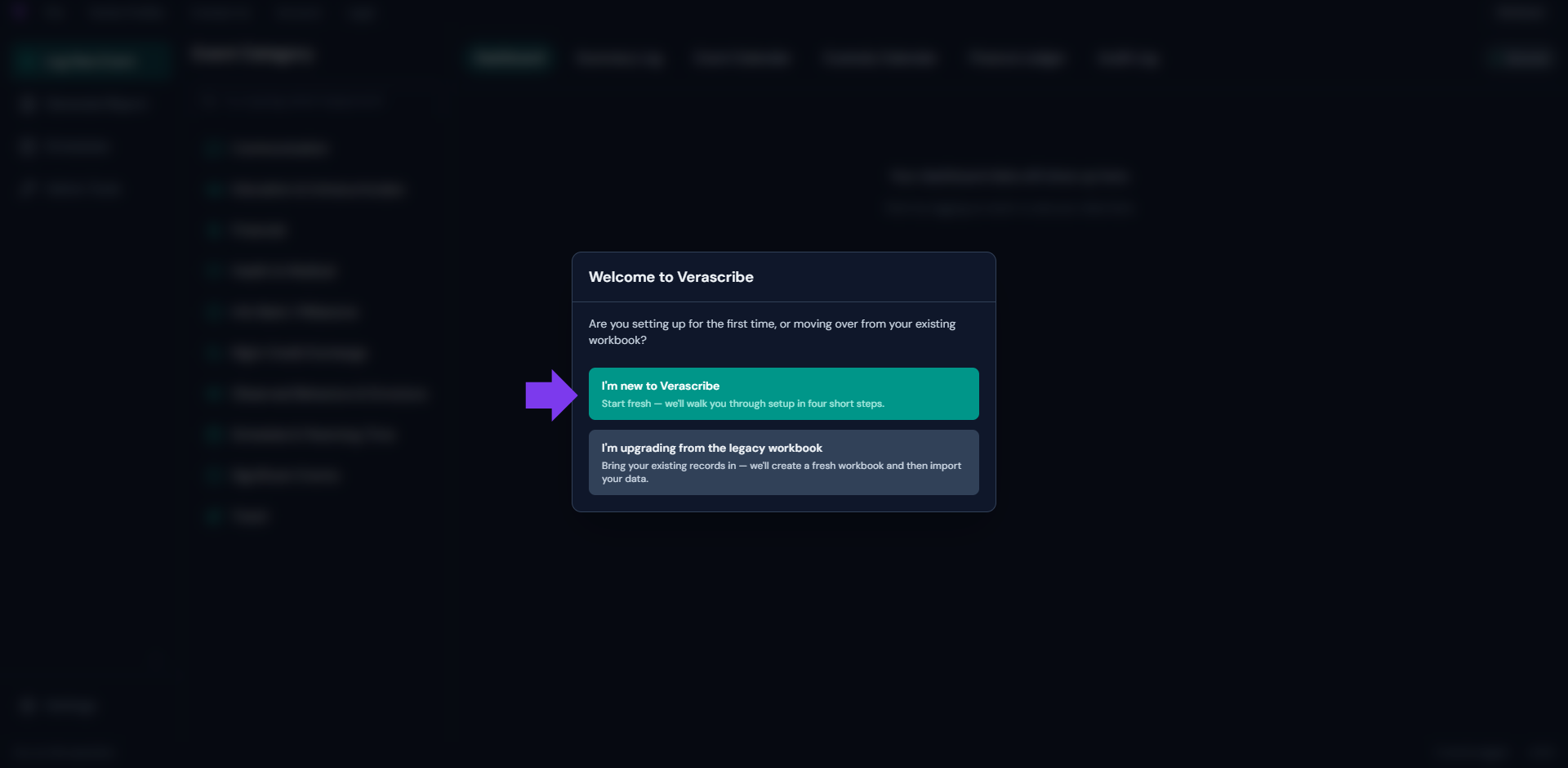
Create your workbook.
Click "Create workbook" in the app. A new Google Sheets workbook is created in your Drive. That workbook is yours — it stays in your account whether you stay with us or not.
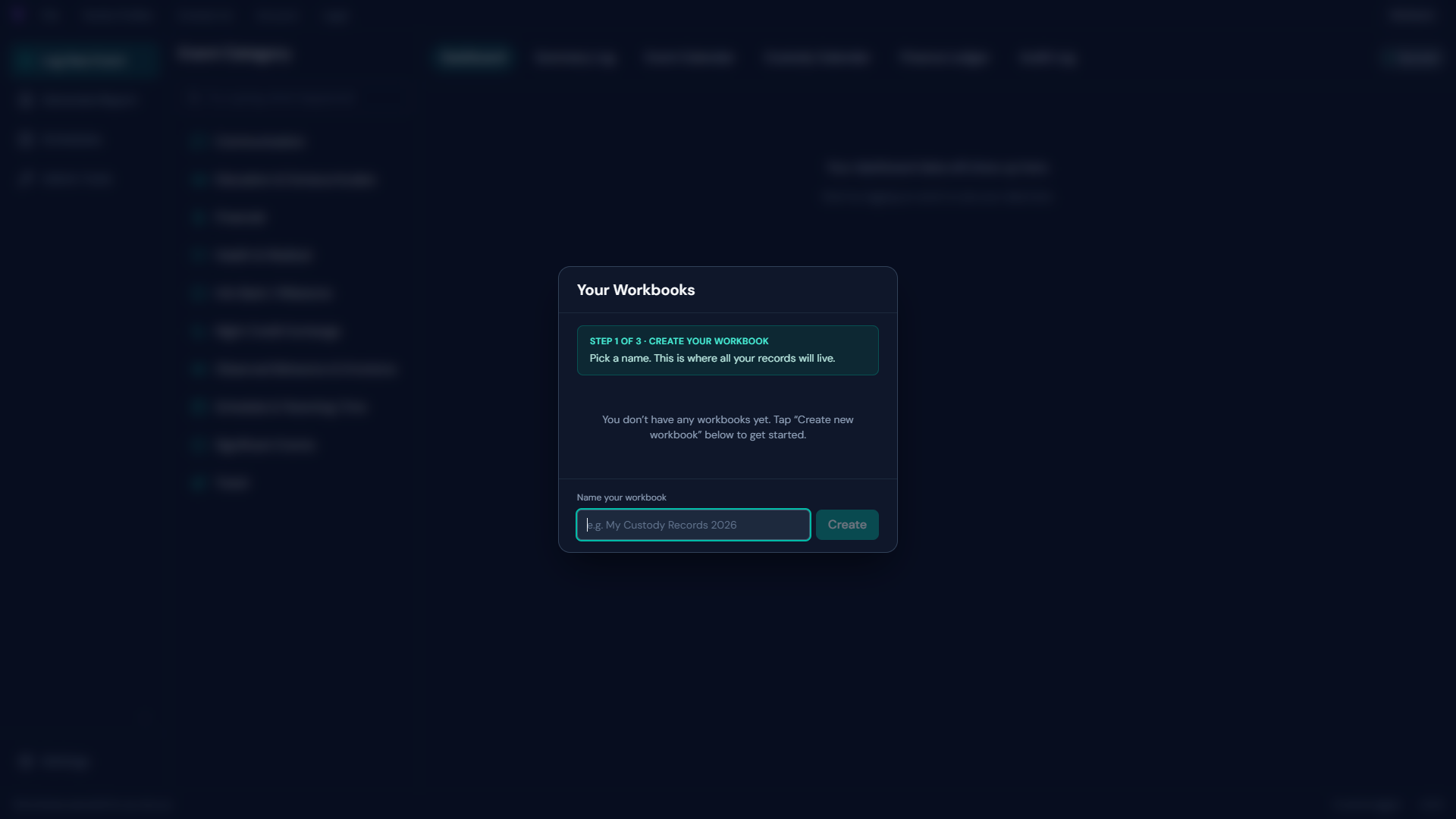
Enter your family profile.
Names for your child or children. Names for the parents. The relationships between them. Two minutes.
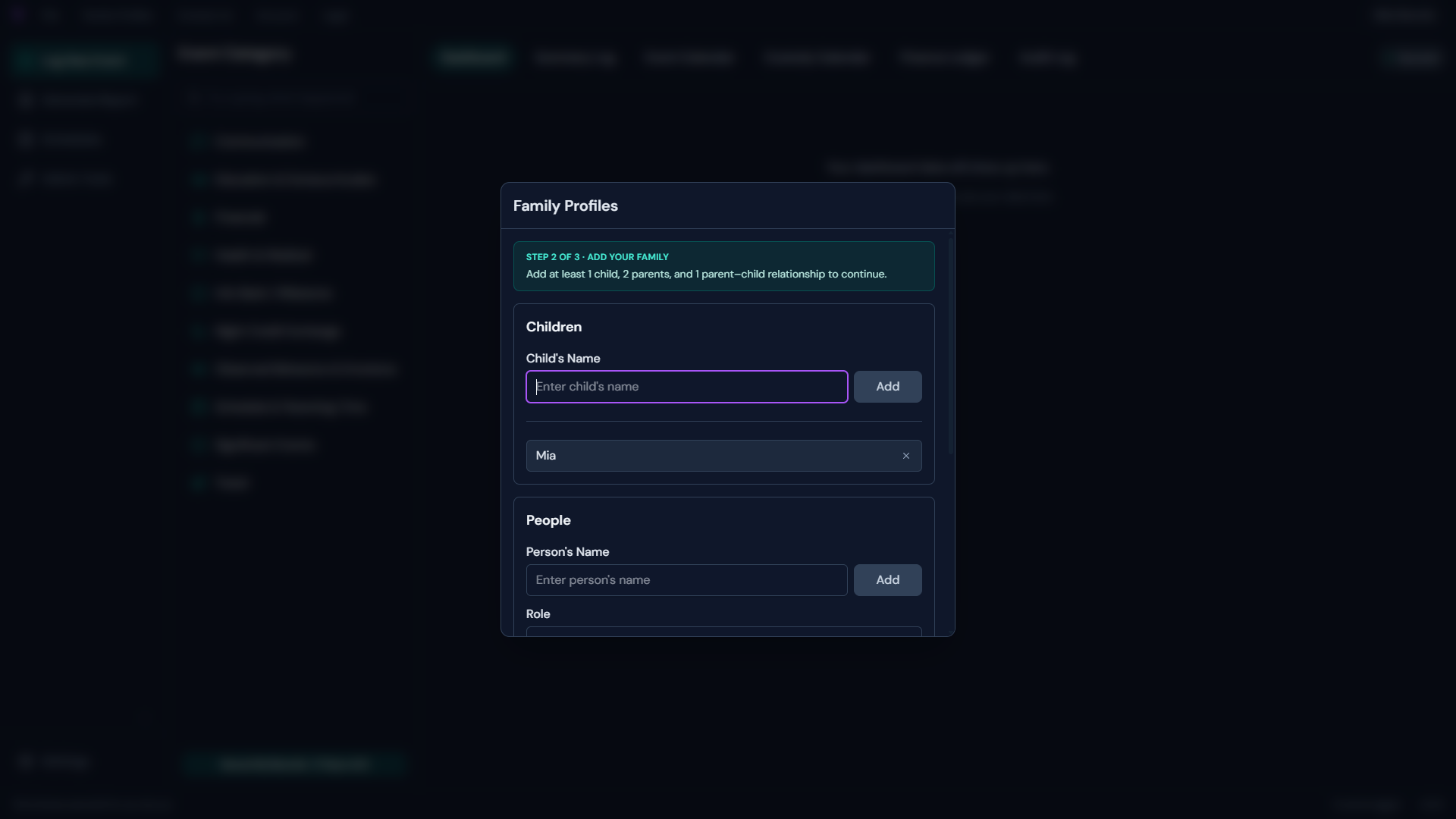
Generate your custody schedule.
Pick a template (2-2-3, week-on-week-off, every-other-weekend, custom) and the calendar fills in. Adjust as needed.
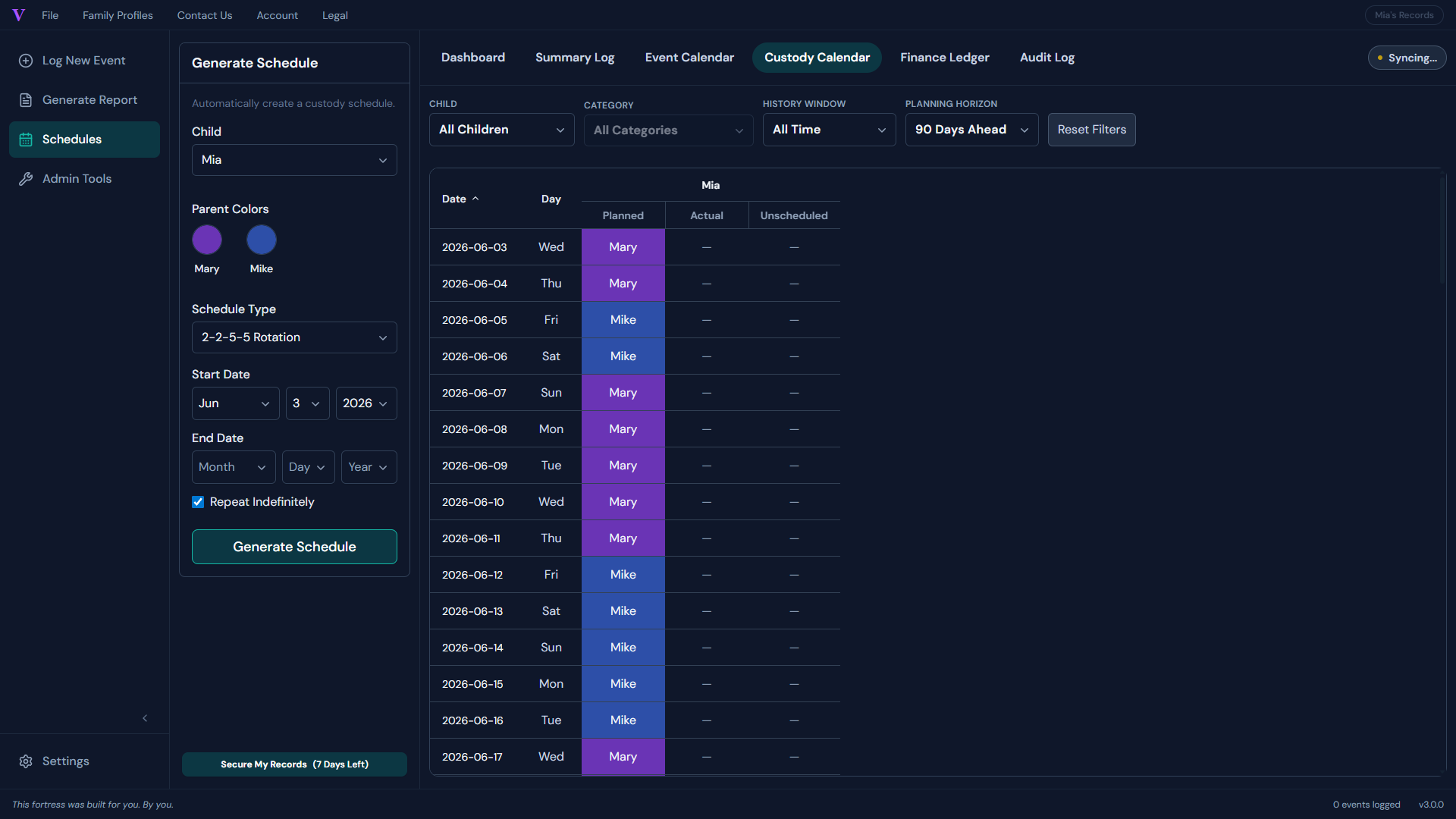
That's the first five minutes. From there, you're logging.
Permissions, in plain English
What you're granting Google
to let the app run.
Verascribe is a Google Workspace app. When you sign in, Google asks you to approve three permissions — and, as part of standard sign-in, shares your email address. That's four things in all, each in plain English below, and you review every one before you grant it.
See, edit, create, and delete only the specific Google Drive files you use with this app
The drive.file scope. It can create and manage only the Verascribe workbooks, evidence files, and reports it saves in your Drive — nothing else in your Drive is visible to it.
Connect to an external service
Lets the app talk to Google's Sheets and Drive APIs and validate your license. The full host list is in the OAuth Disclosure.
Send email as you
Only used when you send a "Contact Us" message from inside the app — to a fixed Verascribe support address you can't change. The app never reads your inbox or any other message.
Plus: your email address (shared at sign-in)
Signing in with Google also shares your email address (the address only — never your inbox or messages). It's part of Google's standard sign-in, used to register your trial, validate your license, and reach you for support.
What we do not access
- Any other spreadsheet in your Drive
- Your Gmail inbox, drafts, or any messages
- Your Google Calendar
- Your Google Contacts
- Your Google Photos
- Any advertising or tracking identifier
We do not run a database that holds your custody, financial, or evidence records. The only data we receive on our side is what's needed to validate your license — your email, your workbook ID, and your license token. Everything else stays in your Google account.
Verified by Google
No "unverified" warning.
Verified by Google.
Google has completed its OAuth verification review for Verascribe Guardian. When you sign in, you'll see Google's standard permission screen — no "unverified app" notice. Verification confirms the app's declared permissions match its actual behavior; it is not a general endorsement.
The trust ground is the same as it ever was — your records live in your own Google account, on Google's infrastructure. Verification means Google has confirmed the permissions we request match the work the app actually does.
What happens next
No auto-billing.
No surprises.
Your records are yours either way.

No auto-billing. We never asked for a card. The trial ends on day seven and nothing is charged.
Your records stay yours. The workbook you created, the entries you logged, the evidence you uploaded — all of it stays in your Google account, exactly where you left it. You can view, search, and export it any time, with no payment. We have no claim on it, and it was never on our servers.
To keep adding new entries past day seven, the next step is a one-year license — $49.99/year, on Etsy. After your year is up, the app moves to read-only — your existing records stay in your Google account, viewable and exportable.
One year of full access. Then read-only — your records stay in your Google account, viewable and exportable.
After purchase, Etsy delivers a quick-start PDF; your personal license token arrives by email separately, usually within the hour.
On-site checkout is in development. For now, Etsy is the route.
System requirements
What you'll need
to run the trial.
-
A personal Google account is best. Personal Gmail accounts (
@gmail.com) work without restrictions. -
Work or school accounts are often blocked. Admins frequently block third-party apps, so use a personal
@gmail.com— it's faster, and it keeps your records separate from anything your employer or school can see. -
A desktop or laptop. Verascribe runs on Chrome, Edge, Firefox, and Safari. Currently desktop and laptop only; mobile and tablet support coming soon.
That's the list.
Start the trial.
Your records live in your own Google account — your Sheets workbook for logs, your Drive folder for evidence. We never see them, before, during, or after your trial.
No credit card, no commitment. Not a subscription — no auto-billing, ever.
"Just what I needed. Simple and straightforward. Great way to document things."
— Charlyne, Verified Etsy review
7-day free trial
Laptop or desktop only