The app runs on a laptop or desktop — not on phones yet. Look around here, then set up on your computer.
What You Can Track
One place for everything that matters.
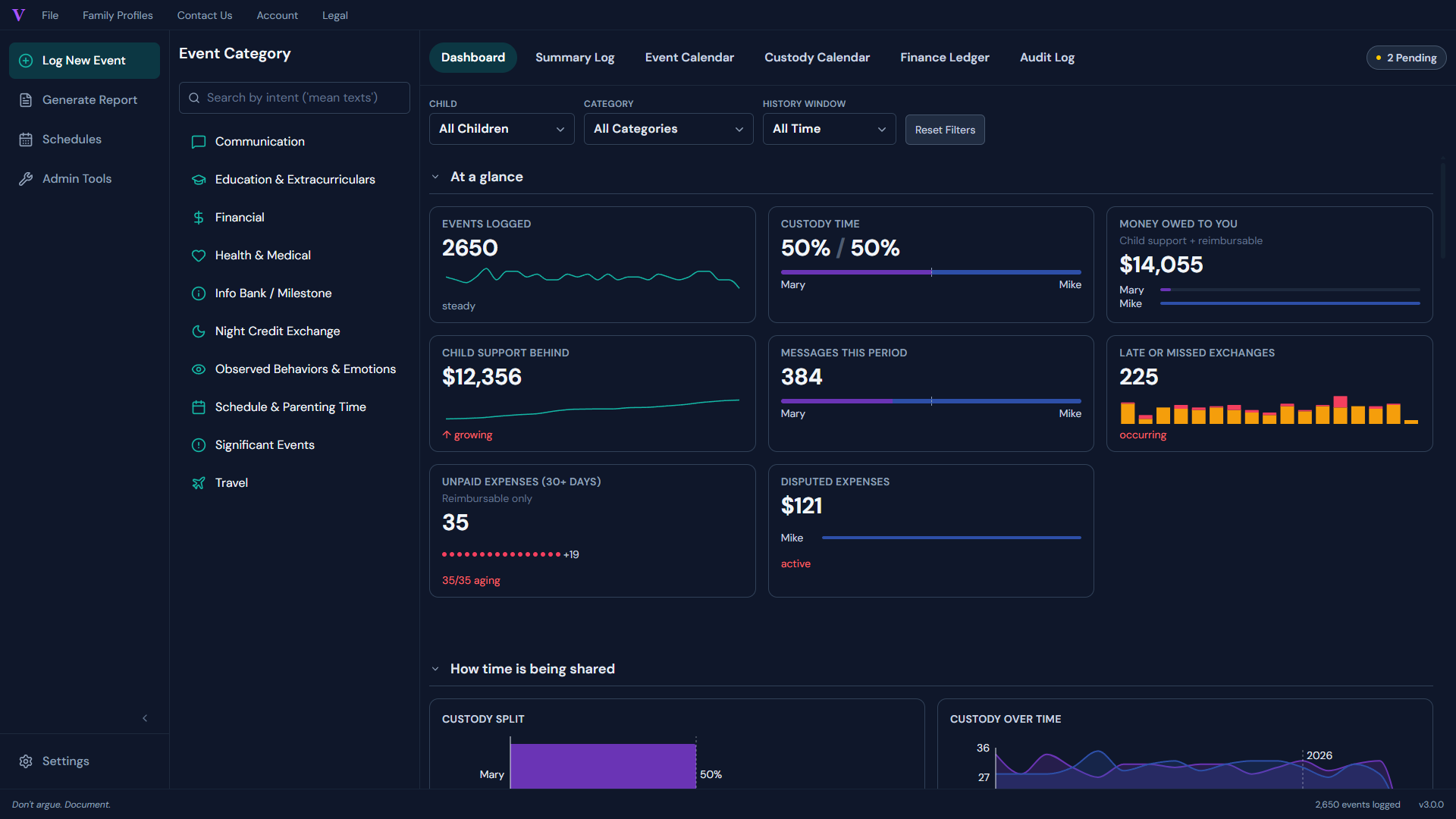
Your custody schedule, every exchange and incident, communications, school and health — all in one record, with a live dashboard that turns your daily logs into clear summaries.
-
•
Custody schedule
2-2-3, week-on/week-off, 50/50, or custom — and log late exchanges, missed pickups, and overnights as they happen.
-
•
A timestamped timeline
Every event — communications, incidents, schedule changes — in one chronological record you can filter to exactly what your attorney needs.
-
•
A live dashboard
Charts and summaries update automatically as you log, so your record is always current.
What Parents Say
Reviews from real Etsy buyers.
"It converts my information into a visual graph for my attorney and family judge to see. The creators have actually added features I mentioned for high-conflict situations like my own."
— Savannah · Verified Etsy review · Feb 2026
"Such a game changer for my documentation with a high-conflict co-parent. It's very simple to use."
— DeAnna · Verified Etsy review · Feb 2026
"I ran into a software problem and they were quick to fix it for me! Works great and great customer service!"
— Lindsey · Verified Etsy review · May 2026
Why This Exists
The record should belong to the person keeping it.
Documentation is what you have when cooperation isn't available. The parent keeping the record alone shouldn't have to depend on a co-parent's participation, a vendor's goodwill, or a subscription that can lock them out of their own history.
So we built Verascribe Guardian so that outcome isn't a vendor's promise — it's the architecture. Your records live in your own Google account, not on a server we control.
Documentation is what you have when cooperation isn't available — and it shouldn't depend on a vendor's goodwill. So your records live in your own Google account, not on a server we control.


Where Your Records Live
Your data. Your Drive.
Your control.
Most apps in this category keep your records on the company's servers — a company you don't control, holding the most sensitive details of your family life. They can read it, lose it, or be subpoenaed. And if you tried to leave OurFamilyWizard or TalkingParents, you may not be able to get your data off their servers even if you ask.
Most apps keep your records on the company's servers — a company you don't control that can read it, lose it, or be subpoenaed.
Verascribe is built the opposite way: there's no "co-parent side" — no portal for the other parent to log into, and no setting that could leak.
Why that means private by design
The other apps are two-party platforms — both parents typically have accounts. Verascribe has no account on our side at all. Your records are private not because you remembered to mark them private, but because the architecture makes any other state structural — not a setting, not a permission you forgot to flip.
Your records live in two places, both of which you already own:
-
Your Google Sheets workbook
The durable record, in your own Google Drive.
-
A Google Drive folder the app creates for you
For evidence files you upload — photos, screenshots, PDFs. Both are yours before, during, and after your license.
-
We cannot see what you write
We cannot read your evidence files. We cannot share your records — because we don't have them. The only thing the app sends out to validate your license is the bare minimum: your email, your license token, and the workbook ID.
Verified by Google — Verascribe has completed Google's OAuth review. You'll see Google's standard permission screen, not an "unverified app" warning.
Verified by Google
Completed Google's OAuth security review — no "unverified app" warning when you connect.
Verified by Google
Completed Google's OAuth security review — no "unverified app" warning when you connect.
Verascribe has completed Google's OAuth verification review. When you authorize the app, you'll see Google's standard permission screen — no "unverified app" notice. Verascribe follows Google's Limited Use policy; verification confirms the permissions we request match what the app actually does.
7 days free · $49.99/year after · no auto-billing
Smart Documentation
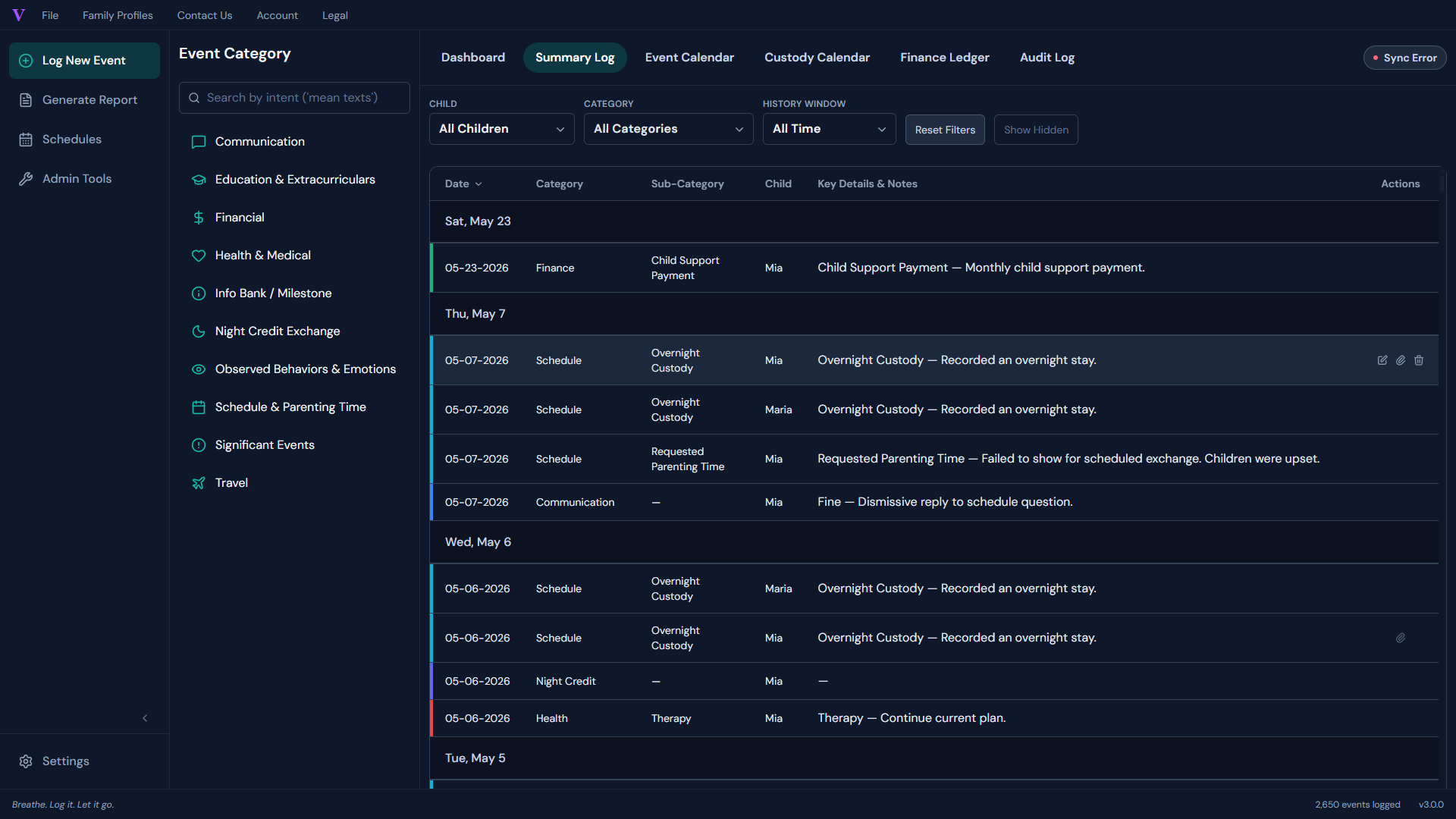
Structured fields for every kind of entry — not a blank note.
The entry you write today has to read cleanly six months from now — to your attorney, your mediator, or to you — and a blank text box won't get you there.
The other apps give you a generic notes field — and leave you typing freeform paragraphs into a cell, hoping you'll remember what mattered six months from now.
See how Verascribe does it instead
OFW calls its field "Info Bank," TalkingParents calls it "Info Library," and AppClose offers no dedicated structured logging at all. Verascribe gives each kind of entry its own form instead — behavioral incidents, serious incidents, court filings, health events, school events, exchanges, expenses — each with the right fields, in the right order, so the entry you make today reads cleanly to your attorney next year. Open the sidebar, pick a category, fill the guided fields, save.
-
•
Structured fields per category
Behavioral incidents, serious incidents, court filings, health events, school events, exchanges, expenses, and more — each with its own form, not a blank box.
-
•
~30 seconds per entry
Most entries take about 30 seconds. Sidebar opens, guided fields, save — and six months on, it still reads cleanly.
Finance Ledger
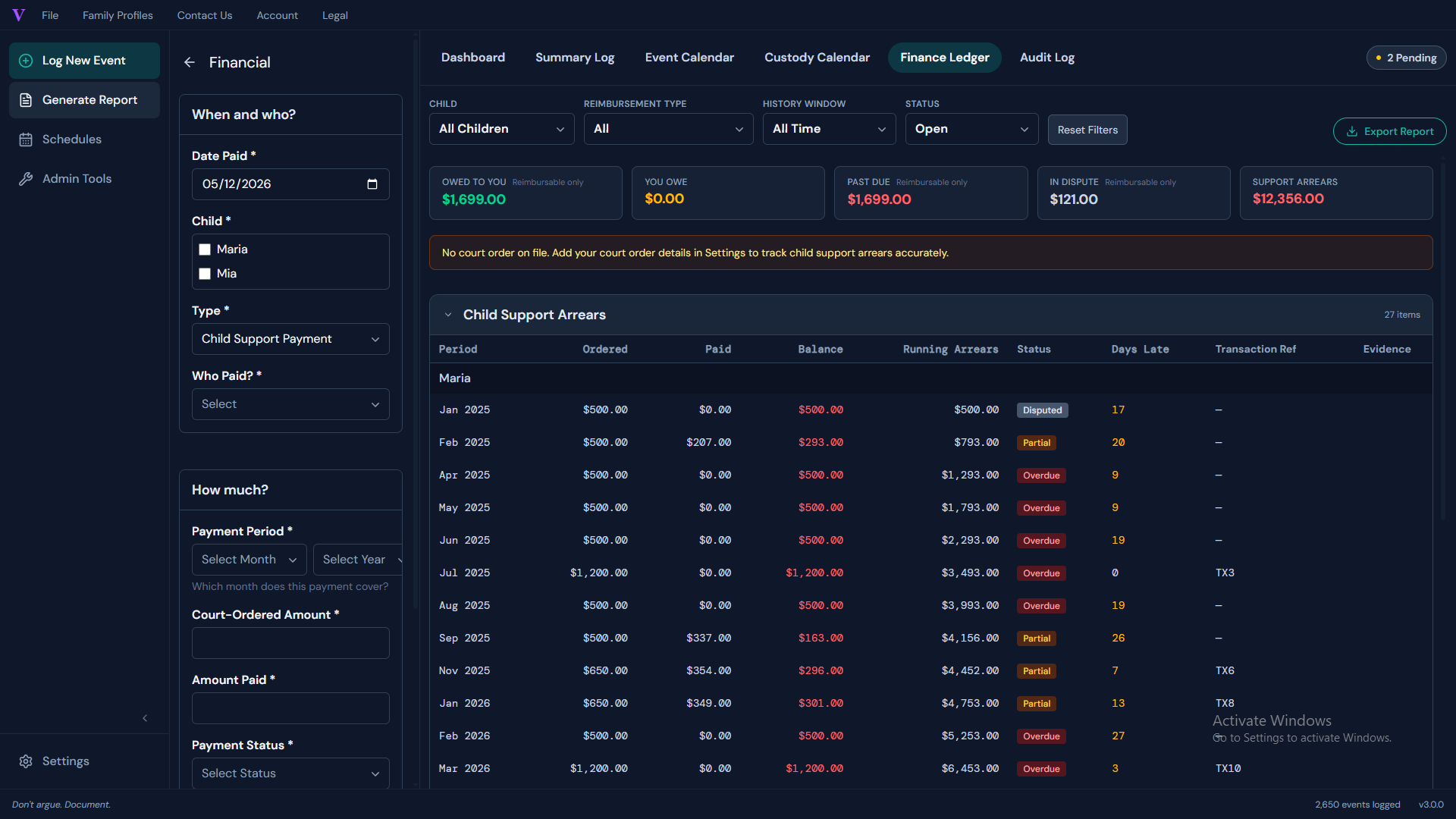
Every expense, accounted for.
Stop arguing over who paid what. The Finance Ledger tracks every shared expense, reimbursement, and financial obligation in one audited record you can share with anyone who needs it.
-
•
Categorized Expenses
Log medical, education, childcare, and travel costs by category so splits and reimbursements are always crystal clear.
-
•
Reimbursement Tracking
Mark expenses as paid, pending, or disputed and keep a running balance of what's owed — no more back-and-forth texts.
-
•
Pay outside the app. Document inside it.
Pay through Venmo, Zelle, bank transfer, or check — then attach the receipt to the log entry. Zero platform fees. Zero visibility for us.
Proof of Keeping
A record kept honestly —
and the evidence to back it.
If anyone ever questions your record, the answer can't be "trust me" — it has to be something you can show: a transparent history of every change, plus the files that prove what happened.
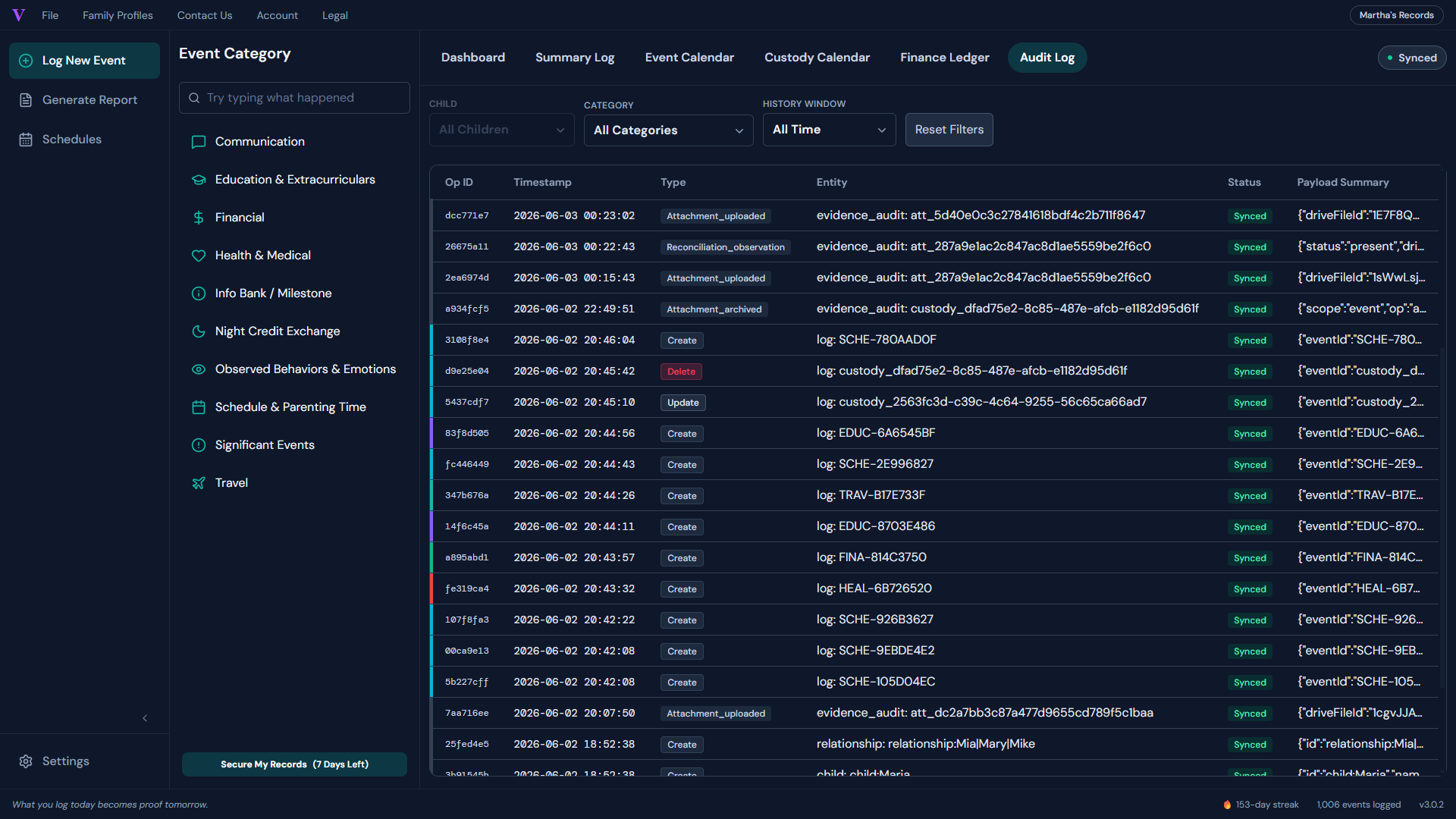
The audit trail doesn't work against you. It works for you.
You can edit or delete any entry — it's your record. But every change is logged automatically, with a timestamp and your attribution. And you can attach the proof itself — a screenshot, a photo, a PDF, almost any file up to 10 MB — to the exact log entry it belongs to, kept in your own Google Drive.
Why that protects you
OFW and TalkingParents track timestamps on messages — but only on messages. Verascribe tracks every operation — create, edit, delete — across every category, so the history speaks for itself. And where the other apps mostly limit attachments to messages or expenses and keep them on their servers (capped by your plan), your evidence files live in a Verascribe folder in your own Google Drive — any file type, on any entry, with no storage tier to outgrow. (A spreadsheet can't really do this — Google Sheets only drops a small image into a cell, no PDFs.)
-
•
Every operation logged
Create, edit, delete — across every category, each timestamped with your attribution. Not just messages.
-
•
Attach any file to any entry
Photos, screenshots, PDFs, almost any file — kept in your own Google Drive, not a vendor's server.
-
•
Yours to read and export
Visible anytime, included in your PDF exports, and no storage tier to outgrow — it's your Drive.
Exports
You logged it.
Now hand it over in two minutes.
Everything you've logged, filtered to exactly the slice your attorney asked for — a clean PDF, ready while you wait.
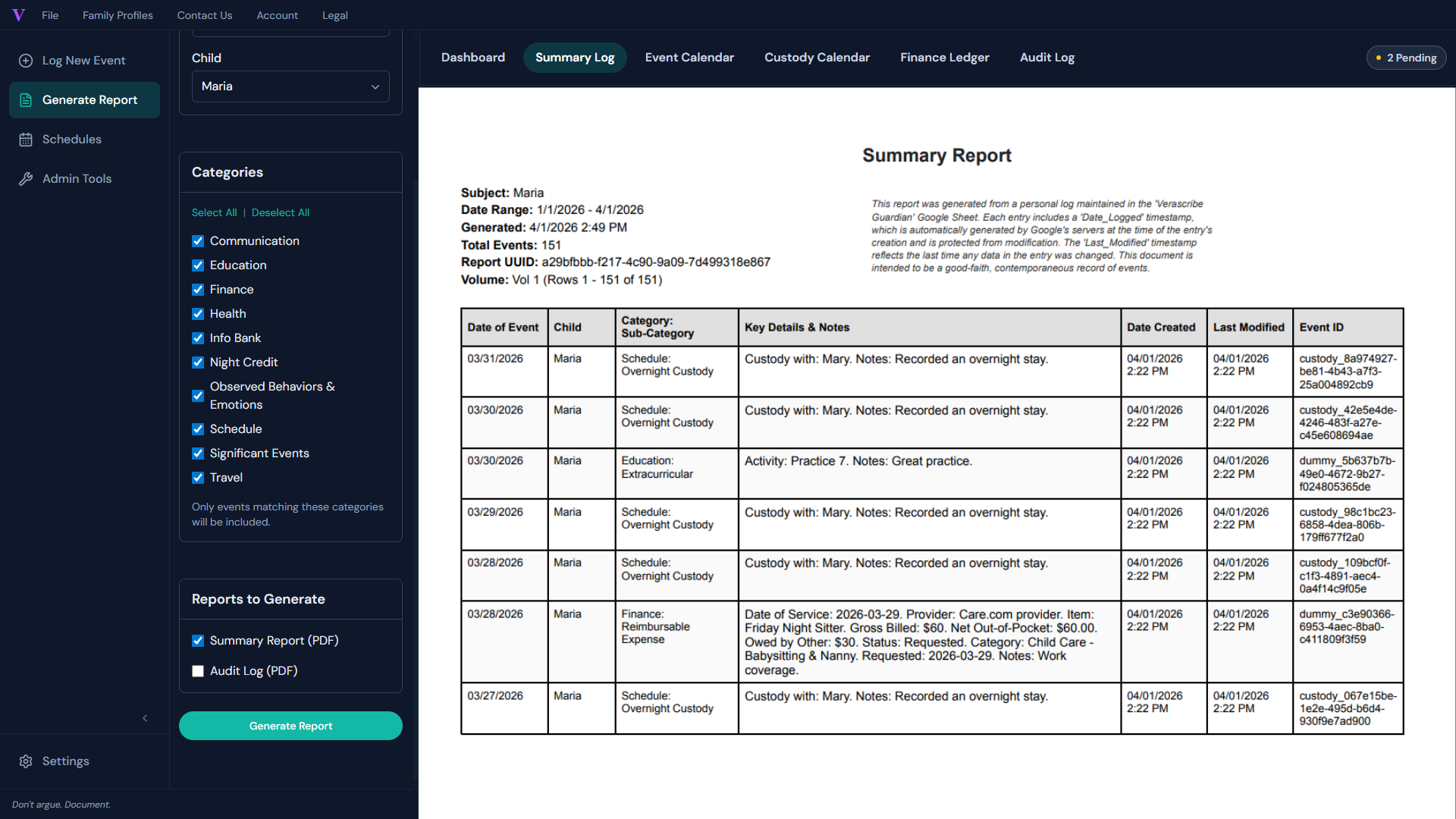
Filter by date range, child, or category — the audit trail is included automatically, and your evidence files come straight from your own Drive. Structured for your attorney to read, not a spreadsheet for them to decode.
Court-formatted exhibits are on the roadmap. Today's PDF captures every detail in a clean, filterable document your attorney can read immediately.
Why Not a Spreadsheet?
Why "templates" — and even the big subscription apps — aren't enough.
How we compare to the big subscription apps.
Most parents start with a spreadsheet template. Some upgrade to a $200/year subscription app. Both have real problems. Verascribe Guardian is the third option.
Cheaper than a spreadsheet template, and a fraction of the $200/year subscription apps. Here's how Verascribe stacks up against the closest paid option.
Price
5-year cost
Where your records live
Attach evidence files (any type)
If you leave or they shut down
Can your co-parent see it?
Audit trail
Auto-billing
* OFW requires mutual consent from all connected parties to delete shared records (ToS, verified May 2026). TalkingParents accounts and records "cannot be deleted or removed, regardless of account status, suspension, termination, or non-payment" (ToS §16, verified May 2026).
7 days free · $49.99/year after · no auto-billing
The License
One year of full access.
Then read-only, forever.
Verascribe Guardian is a one-year license — not a subscription. Pay $49.99 for the year, and you have full access to every feature: log unlimited entries, generate unlimited PDF exports, upload unlimited evidence files, and receive every update we ship during that year.
After your year is up, the app moves to read-only mode — view, search, and export anytime, with no further payment. The only thing that pauses is adding new entries. Renew whenever you want: no auto-billing, no surprise charges, no lockout.
Pay $49.99 for a full year — unlimited logs, exports, and evidence files. After that it's read-only forever: view, search, and export anytime, no further payment, no auto-billing.

- Unlimited log entries
- Unlimited PDF exports
- Unlimited evidence files
- Every update we ship
- View all your records
- Search your full history
- Export anytime
- Renew anytime to resume adding

The app expires. Your records don't.
Your records live in your own Google account — your Sheets workbook and your Drive folder. When the license ends, they don't go anywhere: you can view, search, and export them forever, and delete them whenever you want.
How the other apps trap your records
With OurFamilyWizard, when your subscription lapses you get two grace logins over six months, then you pay again to see your own history. TalkingParents goes further — their Terms state accounts and records "cannot be deleted or removed, regardless of account status, suspension, termination, or non-payment" (ToS §16, verified 2026-05-18). OFW even requires mutual consent from all connected parties to delete shared records — meaning your co-parent can block you from deleting your own history. Verascribe doesn't fit that pattern: the workbook is a Google Sheets file and the evidence folder is a Google Drive folder, both yours, both open in Google without Verascribe in the room.
Common Questions
Before you start.
How is this different from OurFamilyWizard?
OurFamilyWizard stores your records on their servers and charges $110–$300 per year. Verascribe stores your records in your own Google account and charges $49.99 for a full year of access. After year one, Verascribe goes read-only — but your records stay accessible forever. OFW gives you two grace logins in a six-month window after subscription lapse, then locks you out.
Will my co-parent see this?
No. Your records are in your own Google account, accessible only to you. The app is yours alone — there's no "co-parent side" to Verascribe at all.
Can I use this on my phone or tablet?
Not yet. Currently desktop and laptop only. Mobile and tablet support is in active development.
What happens after year 1?
Your records stay in your Google account. View, search, and export them forever — no payment needed. You just can't add new entries until you renew.
Is the PDF court-admissible?
The PDF captures every entry with timestamps and your audit trail. Whether a specific document is admissible depends on your jurisdiction — your attorney is the right person to ask. The audit trail's main job is to let you demonstrate that your records have been kept honestly, which is valuable in any setting where authenticity matters.
What if I have multiple children with different co-parents?
Set up a separate workbook for each co-parent. Same app, same license, completely separate records.
Who You're Buying From
The people who built it are the people who answer.
Verascribe Guardian is built by Nem and Rylan Le at Bear & Tree Studios — no venture capital, no growth team, no ticket system. Email support@myverascribe.com and one of the two of us replies, usually within the hour. Suggest a feature and you're handing it to a two-person workshop that ships fast. And because the app runs on your own Google account, we don't need to hold your records to keep the lights on — which is exactly why we'll still be the ones answering in year three.
Built by Nem and Rylan Le — two founders, no investors. Email support@myverascribe.com and one of us replies, usually within the hour. We'll still be the ones answering in year three.

Nem Le
Product Design

Rylan Le
Customer Relations & Quality Assurance
From the Blog
Documentation strategy for parents who keep records.
Verascribe Editorial publishes long-form writing on documentation strategy, custody-case operating practice, and reflective frameworks for parents in high-conflict separations. Every post fact-checked against primary sources. Every disclaimer policy in place.
Start organizing your records today.
Try it free for 7 days.
No credit card, no commitment. Not a subscription — no auto-billing, ever.
No credit card, no commitment.
Not a subscription — no auto-billing, ever.
"Just what I needed. Simple and straightforward. Great way to document things."
— Charlyne, Verified Etsy review
Currently desktop & laptop only. Mobile and tablet support coming soon. Google account required.
$49.99/year · no auto-billing
Free trial · then read-only, forever