Personal Expenses, Flexible Schedules, and Enhanced Privacy
We understand that when you use this app, you are trusting us with the most sensitive parts of your life—your children’s schedule and your financial history. You need a tool that is not only powerful and private but also responsive to the real-world challenges you face every day.
Summary
In Version 2.1.0, we focused heavily on trust, flexibility, and listening to you. Many of the features in this update came directly from conversations with parents who needed specific tools to tell their story accurately.
Our Belief
We believe your privacy is non-negotiable. Many of you reached out concerned that Google asked for permission to “See, edit, create, and delete ALL of your Google Drive files.” We agreed—that was too broad. Even though we never looked at your personal files, the possibility shouldn’t exist.
We also believe that your records should reflect your reality—not the limitations of an app. When you told us you needed to track your own spending or handle tricky summer schedule changes, we made it our priority.
Our Approach
We completely overhauled the app’s security architecture and core tools.
For Privacy: We migrated to a newer, stricter Google technology (Advanced Drive Service v3) that restricts Verascribe Guardian so it can only see and touch the specific files it created. It literally cannot see your personal photos, tax documents, or other spreadsheets.
For Finances: We updated the math engine to support a “Three Bucket” system (Shared, Support, and now Personal), giving you a complete financial picture without messing up debt calculations.
For Schedules: We removed the “locks” on the calendar tool, trusting you to define when a schedule starts and ends.
The Features
1. A Major Privacy Upgrade
The Request:
Make the Google permissions less scary.
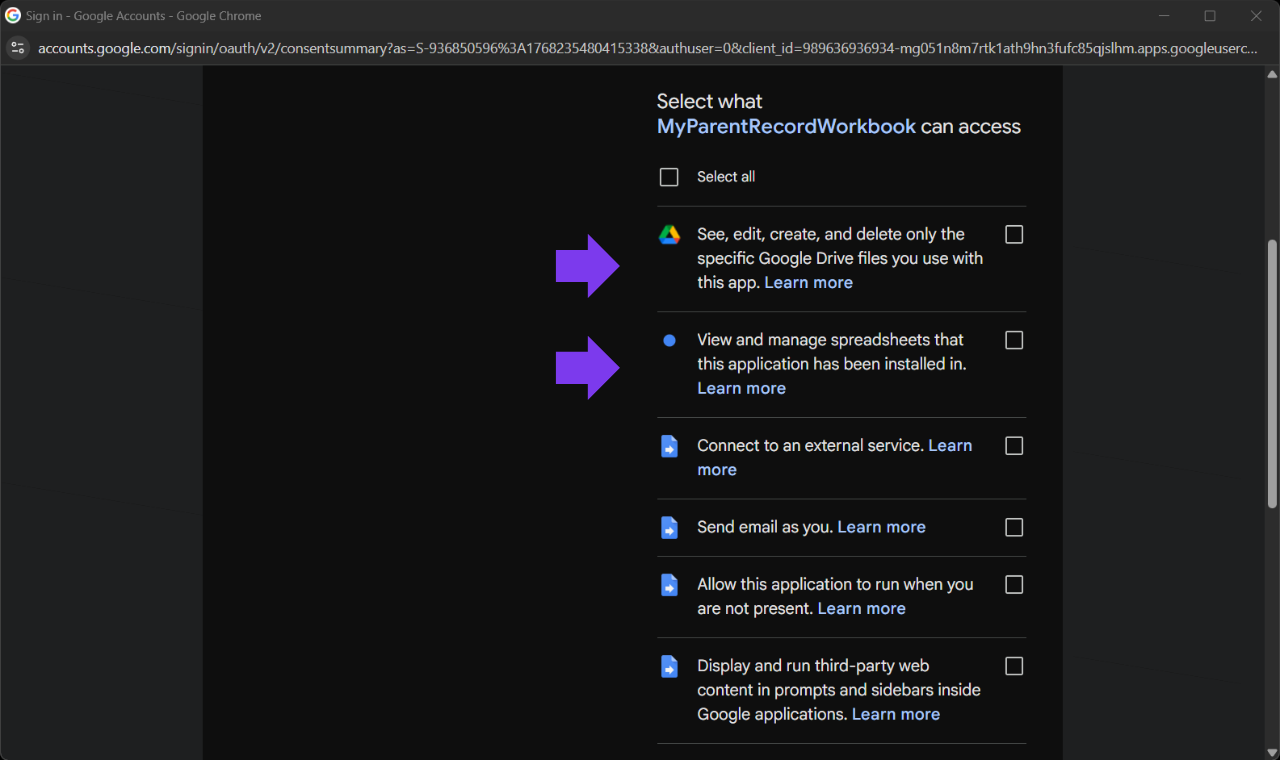
The Result: The app no longer asks for full access to your entire Google Drive. It now only asks for permission to manage the specific “Verascribe Guardian” files and folders. This ensures your private digital life stays private.
“See, edit, create, and delete only the specific Google Drive files you use with this app”: We strictly limit the app so it can only touch files it created itself. It needs this to generate your PDF reports and save backups. It cannot see your personal photos or other documents.
“View and manage spreadsheets”: The app lives inside a spreadsheet. It needs permission to write down the events, expenses, and schedules you type into the sidebar.
“Connect to an external service”: This allows the app to securely check your license key and ensure it is active.
“Send email as you”: This is used only when you click the “Contact Support” button in the sidebar. It allows the app to send a support email on your behalf. We never send emails without you clicking that button.
“Run when you are not present”: This allows the app to perform nightly housekeeping while you sleep—like updating your dashboard so your “Last 30 Days” view is accurate when you wake up. Note (updated): this permission was removed in a later version. Dashboard refreshes now happen client-side when you open the app, so background scheduling is no longer needed.
“Display third-party web content”: This is simply the technology that powers the visual menu and buttons (the sidebar) on the right side of your screen.
2. “Personal Expense” Tracking (User Requested!)
The Request:
I spend money on my kids that I don’t expect my ex to pay back, but I still need to prove to the court how much it costs to raise them.
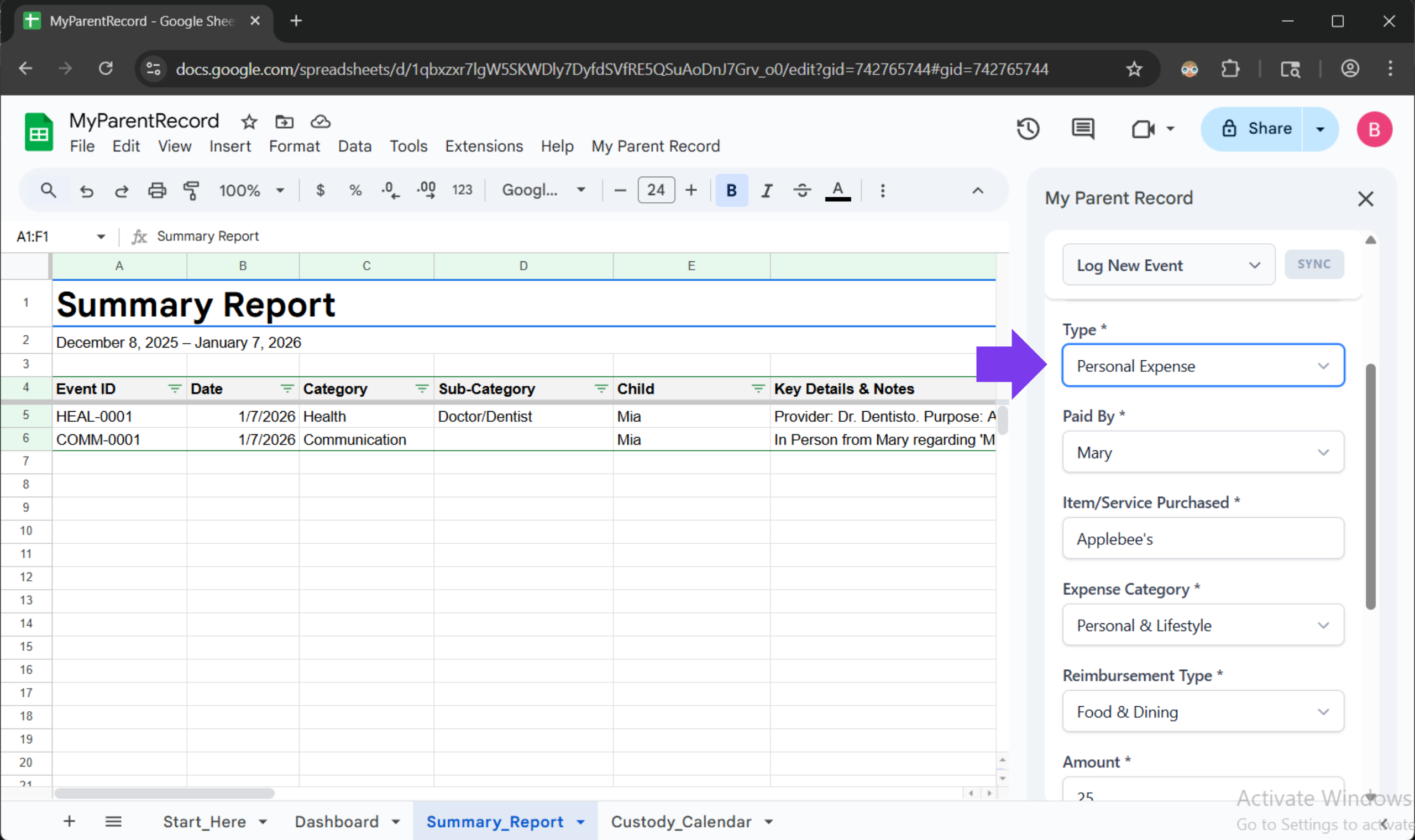
The Feature: You can now log these as “Personal Expenses.” This allows you to track the total cost of raising your child for your own records, without erroneously telling the app that your co-parent owes you money for them.
Bonus: You can now track exactly how you paid (Credit Card, Cash, HSA, Venmo) for every single expense.
3. Real-World Scheduling (User Requested!)
The Request:
My custody schedule changes in the summer. I need a calendar that shows ‘Week On/Off’ for June, but keeps my normal schedule for September.
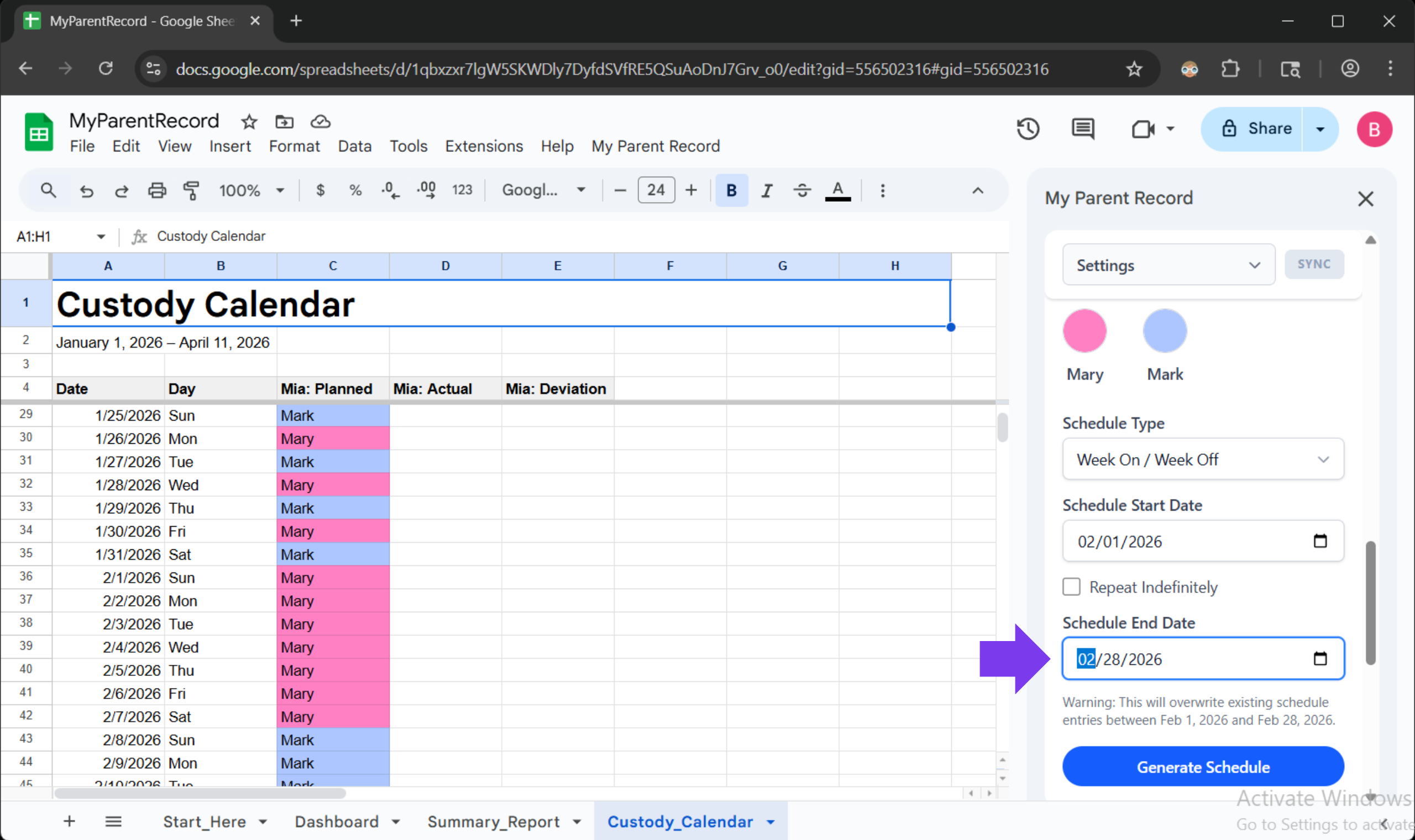
The Feature: The Schedule Generator now supports Date Ranges. You can tell it to generate a schedule just for June 1st to August 31st, without wiping out the schedule you already built for the fall. You can also retroactively fix mistakes in the past without breaking the future.
A Note From Us: We Hear You
Every major feature in this update started as an email or a message from a parent just like you.
When you take the time to tell us, “I wish the app did this,” or “This part is confusing,” you aren’t just helping yourself—you are building a better safety net for other parents navigating the same journey. The new “Personal Expense” tracker exists because one mom needed to prove her financial contribution in mediation. The new “Segmented Schedule” tool exists because a mom needed to handle a temporary custody shift without breaking her records.
Your reality drives our roadmap. If there is something that would make your life easier or your records clearer, please let us know. We are listening.
Technical Changes in 2.1.0
Security & Infrastructure
-
Enhanced Privacy Scope: We reduced the app’s permission requirements. It now strictly operates under the
Drive.Filescope, meaning it can only access files it created, not your entire Google Drive. -
Modern API Migration: Upgraded the backend connection to Google’s Advanced Drive Service (v3). This improves the speed and reliability of PDF generation and file saving.
-
Stability Improvements: Fixed several internal connection issues to ensure smoother performance on the latest Google workspace updates.
Financial Module
-
New Personal Ledger: Added the ability to log Personal expenses. These items are excluded from debt calculations but are tracked for your total cost of parenting.
-
Payment Methods: You can now specify the payment method (Cash, Card, HSA, etc.) for every expense entry.
-
Smart Validation: The app now double-checks your financial entries to ensure required fields (like Payment Method for personal expenses) are filled in before saving.
Schedule Engine
-
Segmented Scheduling: Completely rebuilt the schedule generator to support specific date ranges. You can now generate a schedule for a specific season (e.g., Summer) without overwriting future months.
-
Retroactive Editing: Removed restrictions that prevented editing past dates. You can now generate schedules historically to fix gaps in your records.
-
Smart Auto-Rolling: The system now remembers the End Date of your schedule patterns, ensuring that automatic nightly updates respect the boundaries you set.
-
Maintenance Automation: Maintenance tasks (like cleaning up temporary PDF files and extending the calendar) now run automatically in the background, keeping your account clean and fast without you lifting a finger.
UI/UX Improvements
-
Better Dropdowns: Upgraded all menu dropdowns to a new friendly interface that works better.
-
Sync Visibility: Renamed the sync icon to a clear Sync Data button so you always know how to update your Summary Report and Dashboard.
-
Menu Clarity: Renamed License to License & Updates to make updates easier to find.
-
Smart Dropdowns: Updated all dropdown menus to be aware of the screen edges. If you open a menu near the bottom of the screen, it will now intelligently flip upwards instead of getting cut off, ensuring you can always see all your options without extra scrolling.
Bug Fixes
-
Label Correction: Fixed a button that was incorrectly labeled “Download Summary Report” when it actually downloaded the Audit Log.
-
Registration Flow: Fixed an issue where the app would sometimes ask you to register again even after you had already successfully registered.
-
Large Backup Support: Improved the backup system to handle large workbooks more gracefully, preventing “timeout” errors during import/export.
-
Report Criteria Serialization: Resolved a “Contract Breach” error that occurred when saving report criteria. The issue was traced to google.script.run failing to serialize JavaScript Date objects, causing the server to return null. Implemented server-side sanitization to convert dates to ISO strings before transmission and hardened the client-side Zod schema to handle various date formats.
-
Audit Log Permissions: Fixed a bug where generating an Audit Log would fail with a Permissions Not Sufficient error. The app now correctly requests the necessary access to create Google Docs, so you can successfully generate and save your Audit Logs again.
-
Stability Automation: We added automated checks to our development process to catch these kinds of permission issues before they reach you in the future.
-
Import Error: Resolved an issue where importing small files (under 2MB) would fail with a “is not a function” error. This was caused by a missing connection between the app’s sidebar and the backend import function. The missing link has been restored, and direct file imports now function correctly.
-
Version Display: Fixed a persistent issue where new copies of the workbook would incorrectly display “Version 1.0.0” in the Admin panel. The application now reads its version directly from the software configuration, ensuring that your system always reports the correct release number to the registry and support team.