See All Your Events Without Fuss
Summary
In Version 2.2.1, we focused heavily on user pain points and error safety, and bug fixes.
The Improvements
1. See All Your Events Without Fuss (User Requested!)
The Complaint:
I logged an event and it’s not showing up.
The Feature: “All Time” now truly includes every entry you’ve ever recorded. Your Dashboard, Summary Report, and event form stay in sync automatically—no more missing notes because a rolling time window ended too soon or was too narrow.
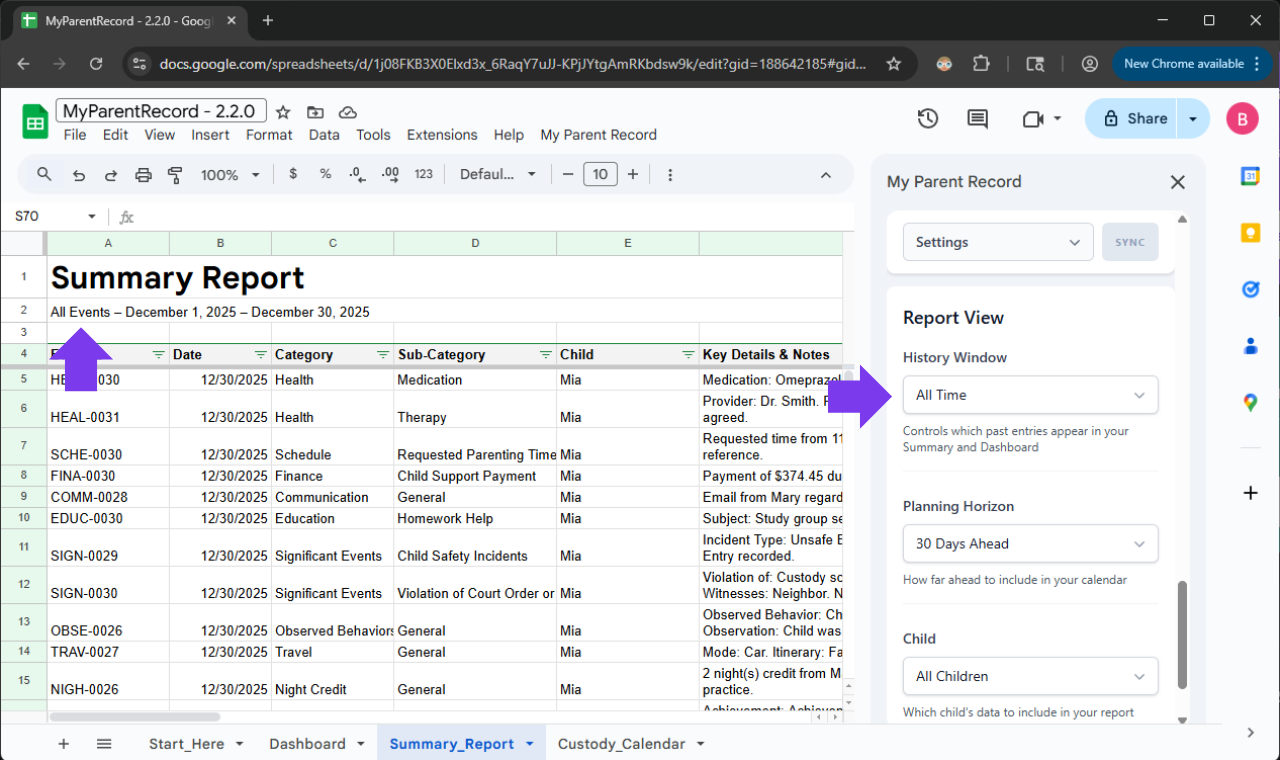
Every memory stays visible—on your terms.
We’ve renamed our core filters to be more intuitive, so the app speaks the same language you do:
-
“Historical Window” (formerly Date Range) is for looking back at what happened.
-
“Planning Horizon” (formerly Calendar View) is for looking ahead at what’s coming.
The New “All Time” Option We’ve added a new “All Time” setting to the Historical Window. When selected, the app automatically stretches to include every single entry you’ve ever made—from your very first log to your most recent update.
| Feature | “All Time” (New) | Rolling Window | Fixed Date Range |
|---|---|---|---|
| What it shows | Every single log you’ve ever entered. | A set amount of time (e.g., “Last 30 Days”). | A specific start and end date (e.g., “Jan 1 to Mar 1”). |
| “The “Hands-Off” Factor” | Set it and forget it. Automatically grows as you add logs. | Updates every day to only show the most recent info. | Stays frozen on those specific dates until you change them. |
| Best Used For… | Complete history. Ensuring no detail is ever missing. | Day-to-day focus. Seeing what happened this month. | Specific Events. Prepping for a mediation about a specific holiday or summer. |
| Action Required | None. It stretches to find your very first and very last entry. | None. It “moves” with you through the year. | Manual. You have to update the dates yourself. |
A Note for Our Existing Users: Because we respect the custom settings you’ve already perfected, we will not automatically change your current view. If you want your reports to default to the “All Time” view, just head over to Settings > Report View and update your preference. We want you to stay in the driver’s seat.
2. Reflecting The Real Ways People Communicate (User Requested!)
The Request:
If you take suggestions. A messenger option under communication would be nice. I am currently putting those under text.
Log It Where It Happens: Modern Communication
Life doesn’t just happen in an inbox. We know that a quick check-in about pickup might happen on WhatsApp, or a shared photo might be sent via Instagram. Your records should reflect your reality.
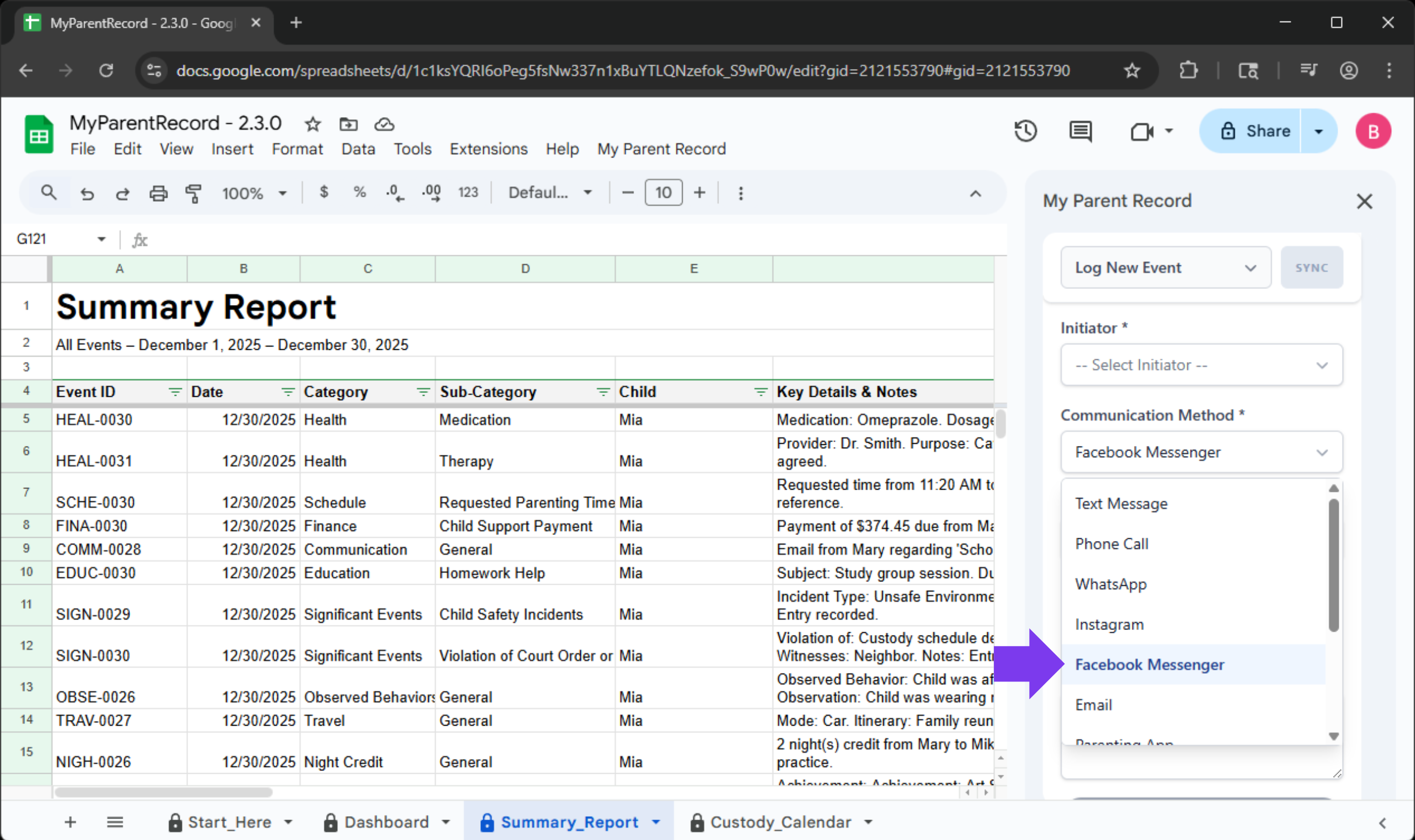
The Communication Log now includes specific options for the channels you already use:
- WhatsApp & Facebook Messenger
- Snapchat & Instagram
- X (formerly Twitter)
How to log your chat:
- Open the sidebar and choose the Communication category.
- Select the Method you used (e.g., WhatsApp).
- Save your entry.
Pro-Tip: By being specific about where a conversation happened, you create a much stronger “paper trail” if you ever need to reference a specific thread later. It removes the “I can’t remember where we talked about that” stress.
A Note From Us: We Hear You
Every major feature in this update started as an email or a message from a parent just like you.
When you take the time to tell us, “I wish the app did this,” or “This part is confusing,” you aren’t just helping yourself—you are building a better safety net for other parents navigating the same journey. The new “Personal Expense” tracker exists because one mom needed to prove her financial contribution in mediation. The new “Segmented Schedule” tool exists because a mom needed to handle a temporary custody shift without breaking her records.
Your reality drives our roadmap. If there is something that would make your life easier or your records clearer, please let us know. We are listening.
Technical Changes in 2.2.1
Improvements
-
Single-Child Smart Defaults: In one-child households, the child dropdown auto-selects for you—just add the details and save.
-
Finance Guardrails: Reimbursable expenses now block negative numbers and auto-calculate owed amounts to keep your math perfect.
-
Communication Logs Stay Clean: We cleaned up the background lists so your spreadsheet stays organized and never sees ‘mystery’ data.
-
Sync Bar Clarity: Success messages fade away after three seconds to keep your view clean, but yellow or red alerts stay visible (and pulse gently) so you never miss an issue.
-
Friendly, Plain English Alerts: We replaced scary technical codes with clear, helpful messages. If the app needs permission or gets stuck, we now tell you exactly which button to click to fix it.
-
Instant ‘Try Again’ Button: Internet blip? Instead of reloading the whole page and losing your place, just hit the new ‘Retry’ button to save your data instantly without creating duplicates.
-
Smarter Connection Checks: We improved how the app handles slow internet. It now checks its connection immediately and stays calm if things are running a little behind, so you don’t see unnecessary error screens.
-
Smoother Data Saving: We strengthened the system against random glitches to ensure your information is saved safely every time.
-
Steadier Calendar Backfills: Custody schedules always start at the very first event, keeping the timeline smooth.
-
Reliable Import Cancels: Stopping an import now ends immediately so you can move on without anxiety.
-
Modern Communication Options: The Communication category now includes WhatsApp, Snapchat, Facebook Messenger, Instagram, and X so you can record conversations on the channels you already use.
Bug Fixes
-
Custom date windows now work exactly as chosen: You can set a start date that’s earlier than your first logged event, and the dashboard, summary report, and custody calendar will simply show the dates you selected (with blank spots where no events exist). No more confusing “Start Date can’t be earlier…” error.
-
Behind-the-scenes safeguard added: We wrote an automated test to make sure this flexibility stays in place, so you can rely on the historical window you pick without surprises.
-
Dates Save Correctly Again: Logs now keep the exact date you chose, even across time zones, so there’s no more “day-early” surprises when you look back at your records.
-
Custody Calendars Stay in Sync: If you remove a child, parent, or relationship, the app now clearly warns you that the linked custody calendar will be cleaned up too. That keeps the sheet tidy and prevents orphaned calendars from lingering.
-
Minute Picker Reliability: The minute dropdowns in Schedule & Parenting → Third-Party Care now show every option as expected, making it easy to log precise care times.