You Asked, We Delivered
New Features: Designed by You
We’ve been listening closely to your feedback, and this update is all about making your co-parenting workflow as smooth and secure as possible.
The Improvements
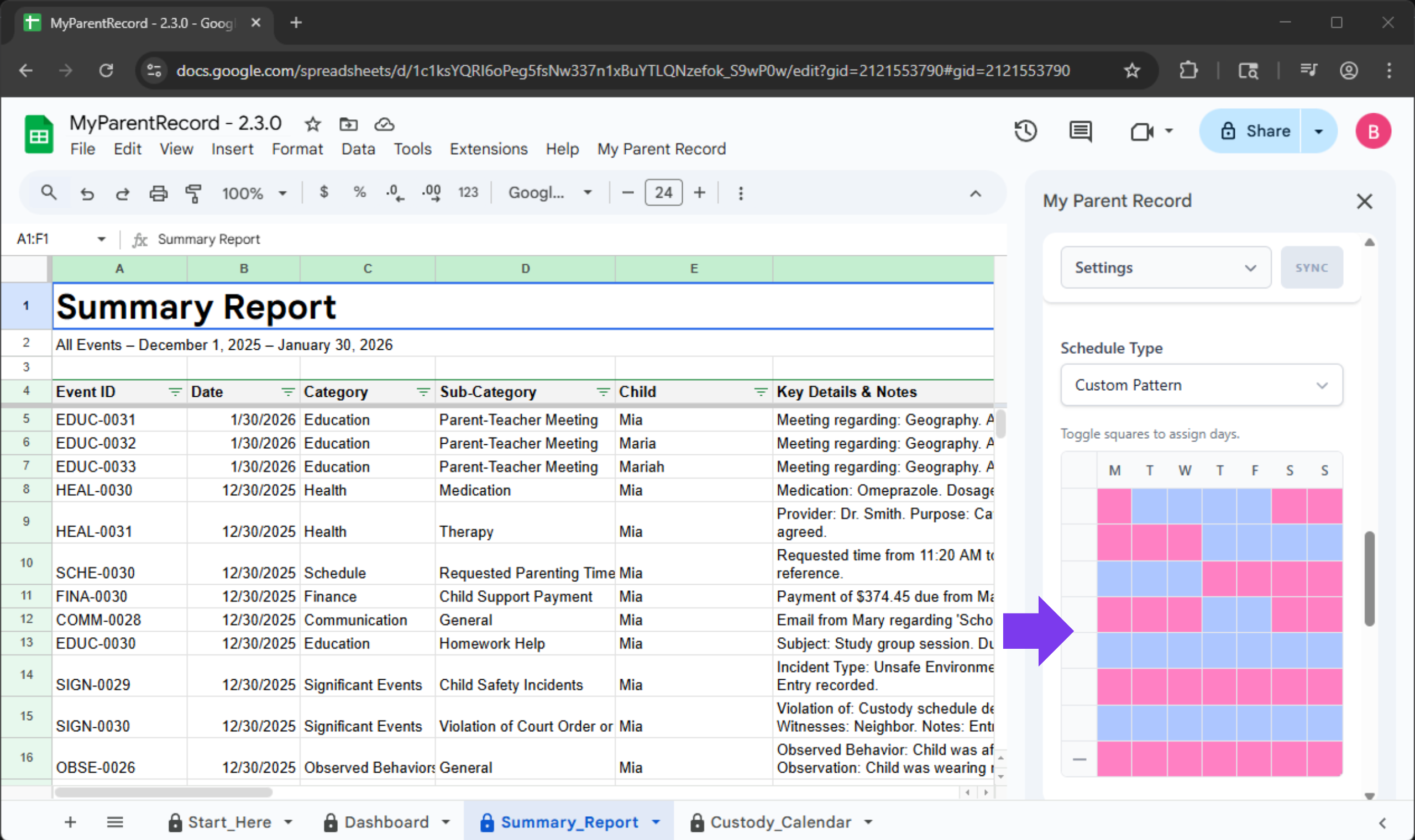
1. Plan Further with 8-Week Rhythms (User Requested!)
The Request:
hey! is there any way to make the schedule grid longer? we do a 4 week rotation and right now i have to manually fix it every month. an 8 week option would be a lifesaver honestly lol
Managing summer camp splits or every-other-month rotations shouldn’t feel like a puzzle. We’ve expanded the custom schedule grid to a full eight weeks. Now you can map out longer repeating patterns in one go, without the need to constantly adjust the schedule.
2. Multi-Child Logging: Save Once, Sync Everywhere (User Requested!)
The Request:
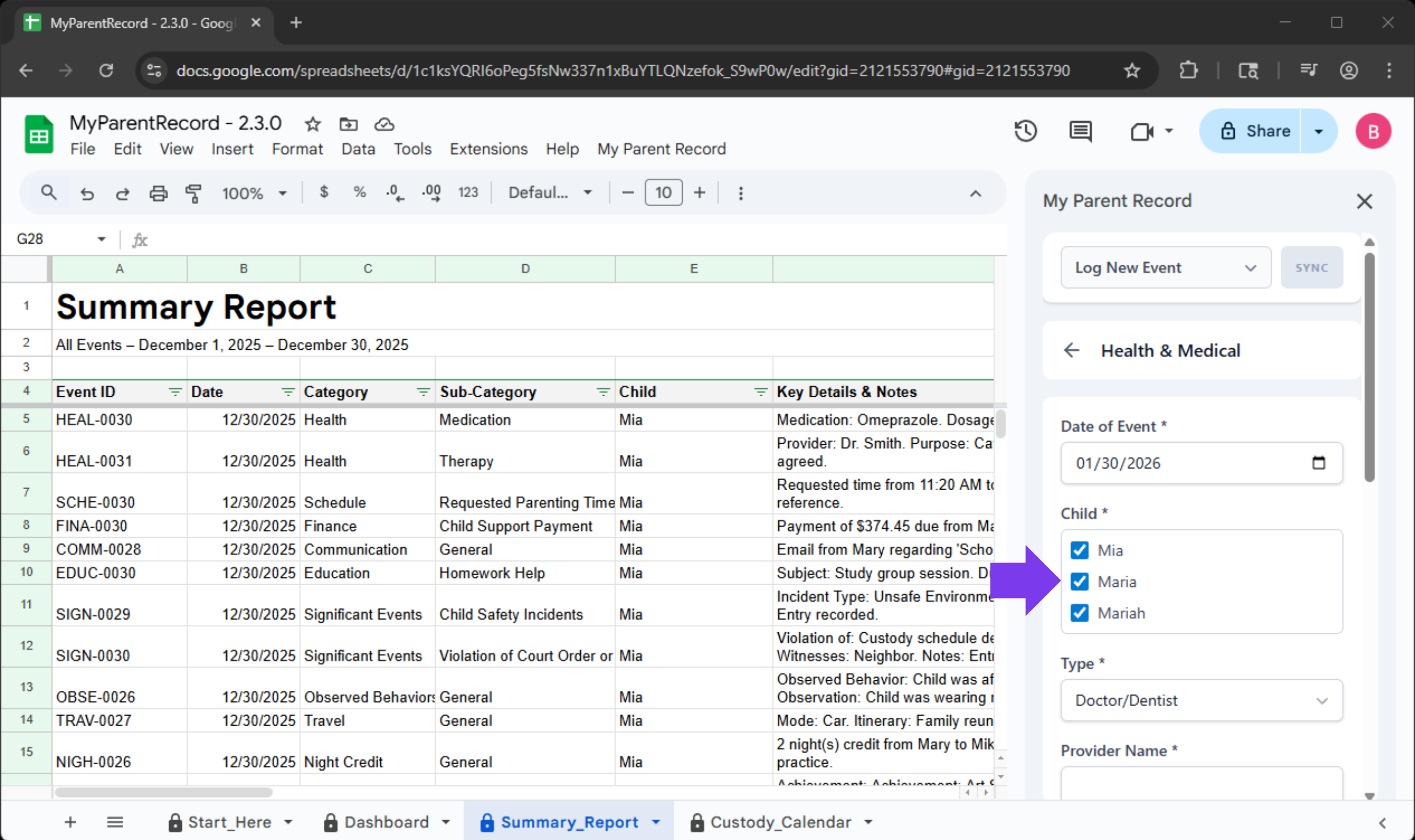
loving the app but quick question. is there a way to log one thing for all 3 kids at once? i have to type the same doctor visit 3 times and it takes forever. would love a ‘select all’ button
If all the kids were at the same doctor’s visit, you shouldn’t have to type it three times. You can now log a single event for multiple children simultaneously. The app handles the heavy lifting, ensuring each child’s individual record is updated correctly, even if they have different parent combinations.
3. Clean Up Records with One-Click Delete (User Requested!)
The Request:
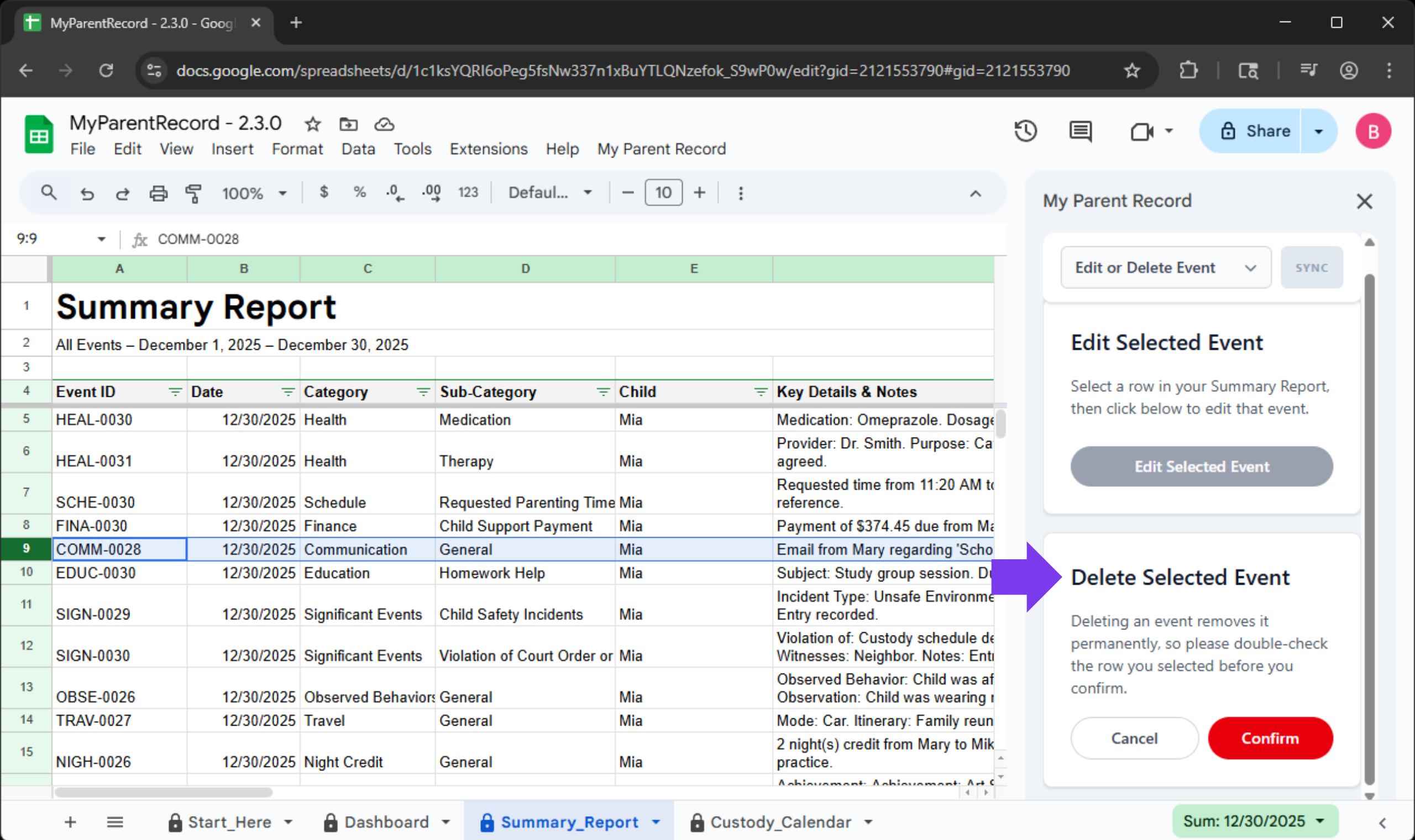
ugh i accidentally logged the same payment twice on the sidebar. how do i get rid of it? i dont want my lawyer to think im padding the records if i print this out today. can we just have a delete button?
We’ve simplified how you manage your history. You can now fully remove an event log directly from the sidebar. Simply select a row in your Summary Report and hit “Delete Selected Event.” It’s the fastest way to tidy up duplicates or accidental entries so your shared timeline stays professional and accurate.
4. The “Escape Hatch” Emergency Backup (User Requested!)
The Request:
i’m super paranoid… if google crashes or the app breaks do i lose all my logs?? i have important stuff in here. can we have a way to just download a backup for ourselves just in case?
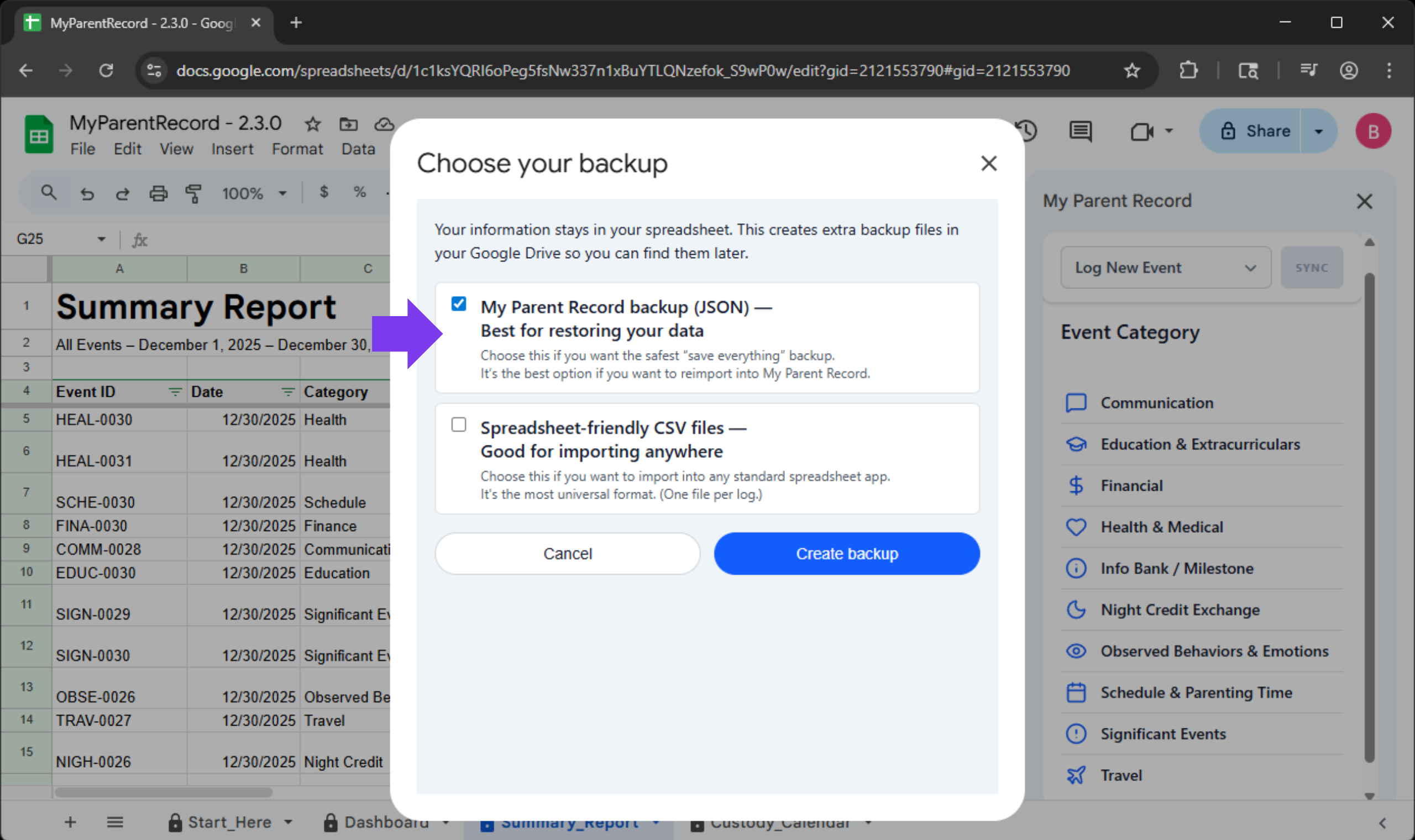
Your records are more than just data—they are your peace of mind and, often, your legal protection. We’ve upgraded our backup functionality so you can grab a fresh, external copy of your data whenever you want. Even if the main app ever experiences a hiccup, your full logs and caregiving notes remain accessible to you.
How to access it:
- Open the ‘Verascribe Guardian’ Menu.
- Select Emergency Backup.
- Choose your settings and let the app save your records directly to your Google Drive.
Why this is different (and why you need it):
We already have export tools in the app, but they serve different purposes. Here is the breakdown:
| Feature | Best For… | Where it Saves | File Format |
|---|---|---|---|
| Standard Export | Upgrading your app or moving data. | Your Desktop | JSON (App-readable) |
| Emergency Backup | Long-term security & peace of mind. | Your Google Drive | JSON + CSV (Spreadsheet-ready) |
ICYMI: 2.2.1
See All Your Events Without Fuss (User Requested!)
The Complaint:
I logged an event and it’s not showing up.
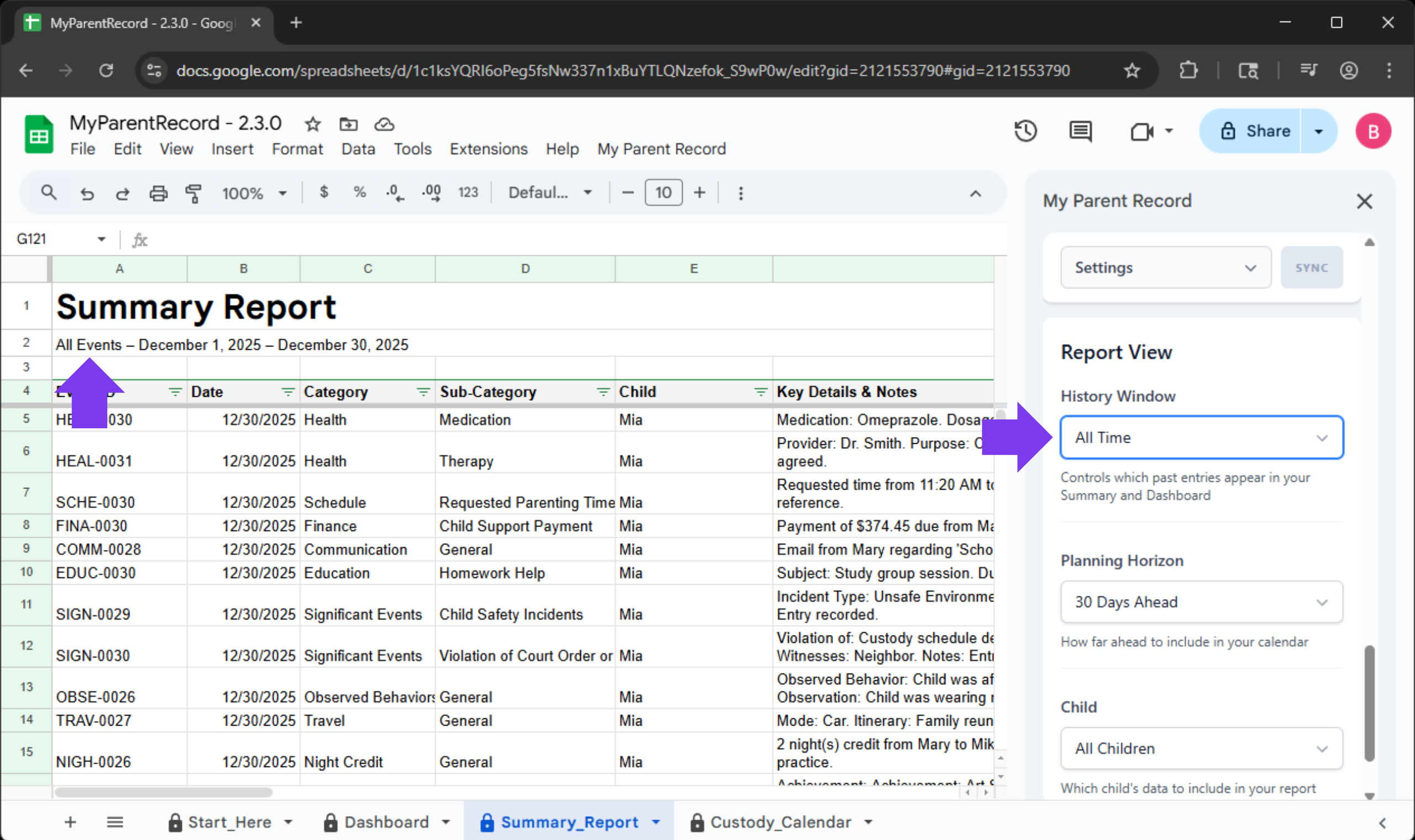
The Feature: “All Time” now truly includes every entry you’ve ever recorded. Your Dashboard, Summary Report, and event form stay in sync automatically—no more missing notes because a rolling time window ended too soon or was too narrow.
Every memory stays visible—on your terms.
We’ve renamed our core filters to be more intuitive, so the app speaks the same language you do:
-
“Historical Window” (formerly Date Range) is for looking back at what happened.
-
“Planning Horizon” (formerly Calendar View) is for looking ahead at what’s coming.
The New “All Time” Option We’ve added a new “All Time” setting to the Historical Window. When selected, the app automatically stretches to include every single entry you’ve ever made—from your very first log to your most recent update.
| Feature | “All Time” (New) | Rolling Window | Fixed Date Range |
|---|---|---|---|
| What it shows | Every single log you’ve ever entered. | A set amount of time (e.g., “Last 30 Days”). | A specific start and end date (e.g., “Jan 1 to Mar 1”). |
| “The “Hands-Off” Factor” | Set it and forget it. Automatically grows as you add logs. | Updates every day to only show the most recent info. | Stays frozen on those specific dates until you change them. |
| Best Used For… | Complete history. Ensuring no detail is ever missing. | Day-to-day focus. Seeing what happened this month. | Specific Events. Prepping for a mediation about a specific holiday or summer. |
| Action Required | None. It stretches to find your very first and very last entry. | None. It “moves” with you through the year. | Manual. You have to update the dates yourself. |
A Note for Our Existing Users: Because we respect the custom settings you’ve already perfected, we will not automatically change your current view. If you want your reports to default to the “All Time” view, just head over to Settings > Report View and update your preference. We want you to stay in the driver’s seat.
Reflecting The Real Ways People Communicate (User Requested!)
The Request:
If you take suggestions. A messenger option under communication would be nice. I am currently putting those under text.
Log It Where It Happens: Modern Communication
Life doesn’t just happen in an inbox. We know that a quick check-in about pickup might happen on WhatsApp, or a shared photo might be sent via Instagram. Your records should reflect your reality.
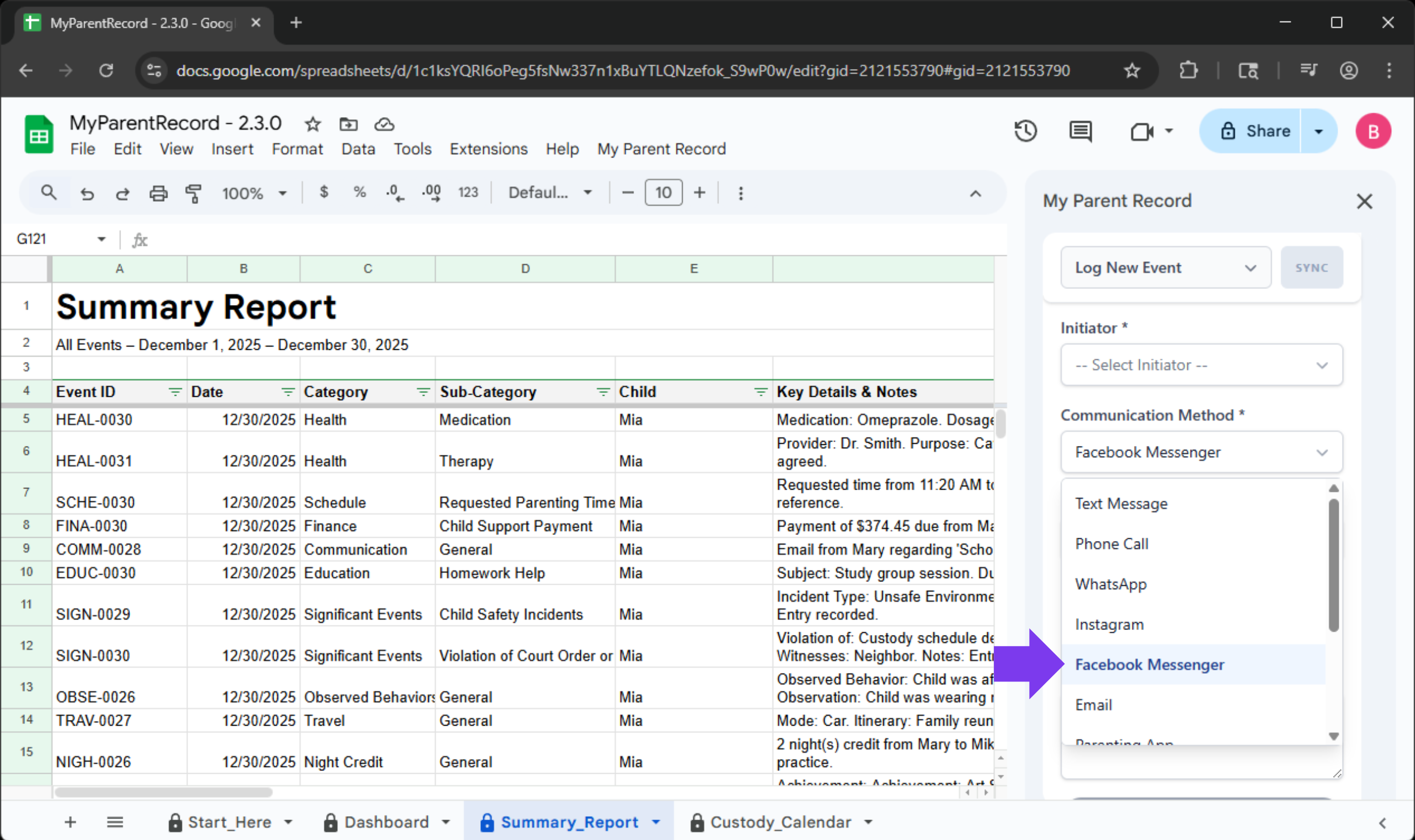
The Communication Log now includes specific options for the channels you already use:
- WhatsApp & Facebook Messenger
- Snapchat & Instagram
- X (formerly Twitter)
How to log your chat:
- Open the sidebar and choose the Communication category.
- Select the Method you used (e.g., WhatsApp).
- Save your entry.
Pro-Tip: By being specific about where a conversation happened, you create a much stronger “paper trail” if you ever need to reference a specific thread later. It removes the “I can’t remember where we talked about that” stress.
A Note From Us: We Hear You
Every major feature in this update started as a message from a parent just like you.
When you take the time to tell us, “I wish the app did this,” or “I’m worried about my data,” you aren’t just helping yourself—you’re building a better safety net for every other parent using this tool. The new 8-week schedule grid exists because a dad needed to map out a month-on, month-off rotation without the headache of manual overrides. The new “Escape Hatch” backup exists because a parent needed to know their full record was safe, no matter what.
Your reality drives our roadmap. If there is something that would make your life easier or your records clearer, please let us know. We are listening.
A Small Favor: Help Us Reach More Parents
We are a small team, and we rely entirely on word-of-mouth. If this app has given you a little more peace of mind, would you consider leaving a quick review on Etsy? It takes less than 60 seconds, but for a parent searching for a “safety net” in a tough moment, your review might be the reason they finally find the tool they need. You’re not just helping us; you’re helping another parent find their footing.
Technical Changes in 2.3.1
What’s New: Clarity & Peace of Mind
-
A Clearer Privacy Promise: We know “Google Permissions” can sound technical and intimidating. We’ve added a dedicated Privacy Policy sidebar that explains exactly what each permission means in plain, everyday language. We want you to feel 100% secure knowing exactly how your data is—and isn’t—being used.
-
Schedule Safety Guardrails: Your schedule is the heartbeat of your planning. To ensure you never accidentally replace dates you didn’t mean to, the app now clearly lists the exact date range about to be updated. A quick checkbox confirmation ensures that every change is intentional.
-
Smarter, Faster Reporting: Generating reports should be effortless. We’ve updated the date selection to “guide” you toward the months that actually contain data. This eliminates “empty” reports and saves you the frustration of trial and error.
Improvements & Technical Fixes
-
Communication Log Fix: The Facebook Messenger option is now fully functional. You can select it and save your entries without interruptions.
-
Calendar Syncing: Fixed an issue where extending your planning horizon wouldn’t automatically extend the schedule pattern. Everything now stays perfectly in sync.
-
Smart Validation: We’ve added “warning-only” protection to high-traffic sheets (like the Dashboard, Summary Report and Custody Calendar) to prevent accidental edits while still giving you the flexibility you need.
-
Data Cleanliness: Entries for money and night exchanges now prevent “0” or negative values, ensuring your financial and custody records remain accurate and professional.
-
Field Logic: Parent and initiator fields now unlock more reliably once a child is selected, making data entry feel intuitive rather than restrictive.
-
The “Invisible” Security Guard: Every time you log an event, the app now runs a silent background check. It verifies every detail and ensures your records are saved cleanly—even if Google’s storage services are having a slow day. You won’t see it working, but you’ll feel the reliability.